
TOTP App
| TOTP App | Browser Integration Mobile | Browser Integration Desktop | Pro | Contra |
| KeepassXC recommended |
yes | Via browser plugin. |
Save extra data. Optional: Sync to many devices. |
- |
| yes | - |
Known to many users |
Only on mobile. Only on ONE device. |
|
|
Apple Password (App) |
Yes | Yes | Very handy if you are in the Apple ecosystem. It often autofills automatically (similar to password auto-completion). Otherwise, you can open the Passwords app to view the code. |
Limited outside the Apple ecosystem. |
|
Google Authenticator |
yes | - | - |
Only on mobile. |
- There are other apps and online services, acting as TOTP Apps.
- TOTP is a standard.
- MS-Authenticator: If the mobile phone changes, remember to de-register first, before a new one can be registered.
Register a TOTP App
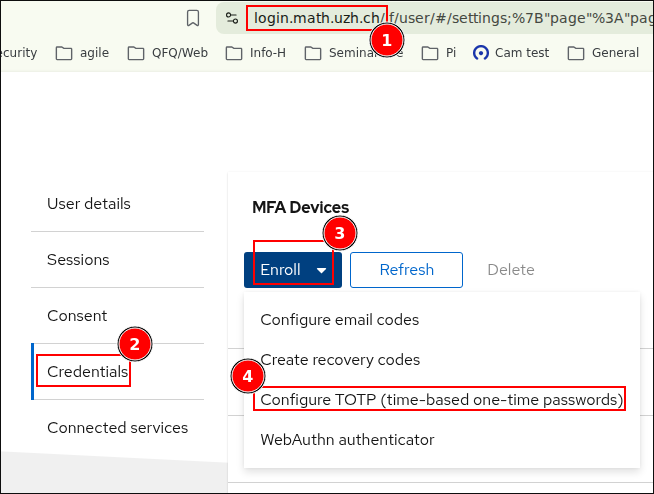
Create a QR Code / TOTP Secret
- Login https://login.math.uzh.ch
- Enroll to
Configure TOTP (...
Scan the QR Code / copy the secret
- [1] Open any Authenticator App on your phone, or (if using Keepass on a desktop) just copy the secret
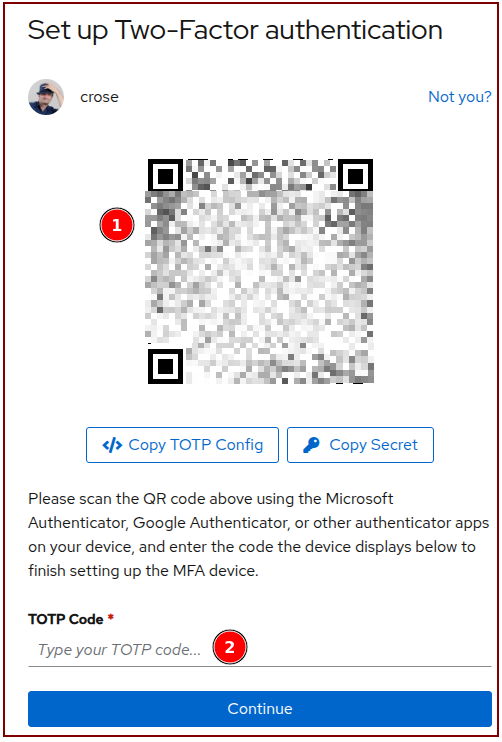
- [2] Type the new TOTP Code shown on your app into (2), to finalize the registration.
No comments to display
No comments to display