
MFA: I-MATH & DM3L - text based setup via SSH
Text based alternative MFA setup option via SSH
If you have no clue what SSH is - skip this section, you won't miss anything.
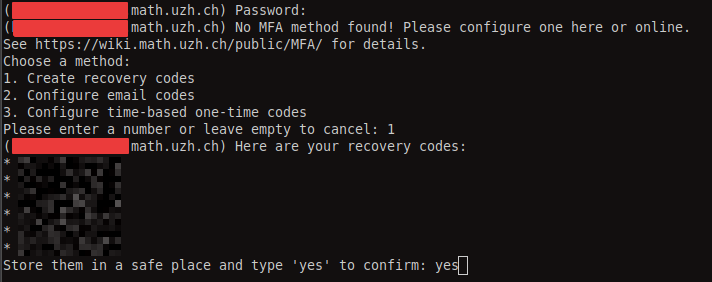
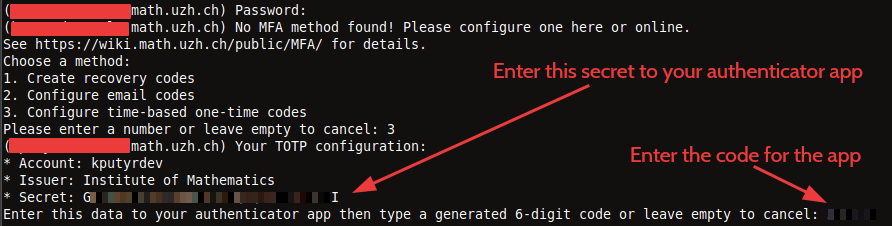
The second factor is checked by SSH connections. If no second factor is configured yet, you will have a chance to configure one.
Note 1: You can select any text with a mouse and copy to the clipboard with Ctrl+Shift+C.
Note 2: Press Ctrl+C to cancel the authentication at any step.
- Recovery codes:
- TOTP: copy the secret to your authenticator (such as KeePassXC)
- Email: the email assigned to your account will be used

If second factor is already configured, you can use a code from any method. Type email to request an email code - an email is sent automatically only when it is the only method. 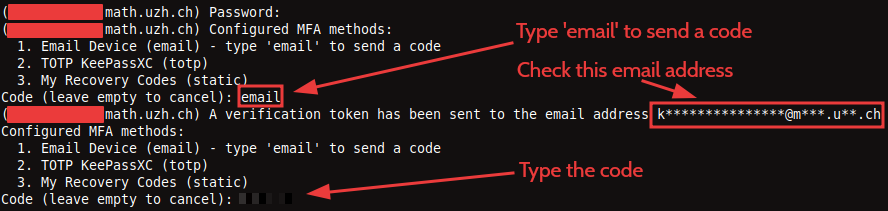
Entering an invalid code does not break the authentication process: you will be given another chance to enter a correct code.
No comments to display
No comments to display