Skip to main content
dropbox
- Dropbox is a US based commercial company. Any data saved via Dropbox are affected by US laws.
- At UZH, the recommended alternative to dropbox is Switchdrive: http://drive.switch.ch.
- Advantages of Switchdrive against Dropbox:
- Switchdrive: Swiss data protection laws are respected.
- Switchdrive: Diskquota: 50GB.
- Switchdrive: All major OS are fully supported.
- Switchdrive: No device limit.
- 2019/03: New 3 device limit (non-paid account) https://help.dropbox.com/account/computer-limit
I-MATH: Thinlinc
- Disk usage of Dropbox is separated from I-MATH home quota.
- The default disk quota for the thinlinc dropbox installation is 10GB. If you need more, please contact the IT-support.
Installation
- End of 2018, dropbox limits the linux client to only operate on ext4 filesystem.
- To fulfil the requirements in the thinlinc environment, we've installed a system wide workaround.
- If you run into trouble during installation, please contact the IT-support.
- Start: Applications > Internet > Dropbox.
- If you start 'dropbox' the first time: you're asked for your I-MATH password - please provide.
- The first start might take several minutes! Please be patient.
- Click 'OK' to start the Dropbox installation.
- After some time, a webbrowser opens and asks you to log in via dropbox.com to your dropbox account: do this.
- Again after some time, you'll be prompted with:
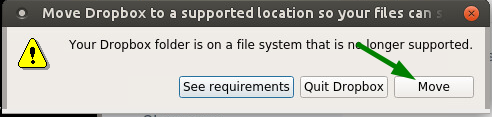
- Click on
Move.
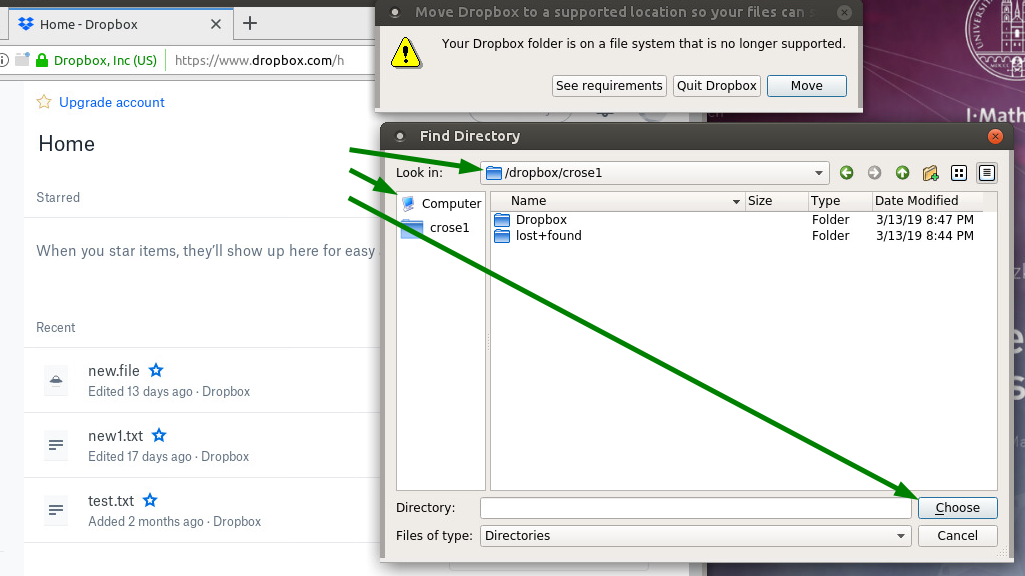
- The above windows stays in front - move it to the side, navigate to
/dropbox/ and click Choose.
- If you already have a lot of files in your Dropbox, it might take several minutes until the files are synchronized.
FAQ
- Q: I'm missing my Dropbox folder?
- A: Navigate in the filemanager to
/dropbox/.
- Q: I don't like
/dropbox/. Can I move it to a different location?
- A: No. Only
/dropbox/ will work in a thinlinc environment.
- Q: Are there snapshots/backups of
/dropbox/?
- A: No. The ext4 filesystem does not support snapshots. Use the Dropbox webinterface to access older versions of your files.
- Q: My local folder
/dropbox/ runs out of space, what can I do?
- Q: On the compute hosts, there is no `/dropbox/'!
- A: Unfortunately, that's correct. The new Dropbox directory is only available inside of the thinlinc session.
- Q: My Dropbox on thinlinc does not sync.
- A: Please try to start again
Applications > Internet > Dropbox. Wait 1 minute before doing any action.
- Q: Dropbox was fine but now it asks me to move a directory.
- A: Start Dropbox again via Applications > Internet > Dropbox - if it is still broken or asks you again: wait one minute and start it again.

No comments to display
No comments to display