
pdf compression
With gson thinlinc
Source: https://itsfoss.com/compress-pdf-linux/
Via commandline:
gs -sDEVICE=pdfwrite -dCompatibilityLevel=1.4 -dPDFSETTINGS=/prepress -dNOPAUSE -dQUIET -dBATCH -sOutputFile=compressed_PDF_file.pdf input_PDF_file.pdfYou have these compression options:
| dPDFSETTINGS | Description |
| /prepress (default) | Higher quality output (300 dpi) but bigger size |
| /ebook | Medium quality output (150 dpi) with moderate output file size |
| /screen | Lower quality output (72 dpi) but smallest possible output file size |
With Adobe Acrobat on Windows Server
Adobe Acrobat comes with a tool to compress PDFs to smaller filesizes.
The institute has a version of Adobe Acrobat installed on our Windows Servers. To access it, please go to Applications > Internet > Windows Small (or any size)
- Open the file in Adobe Acrobat.
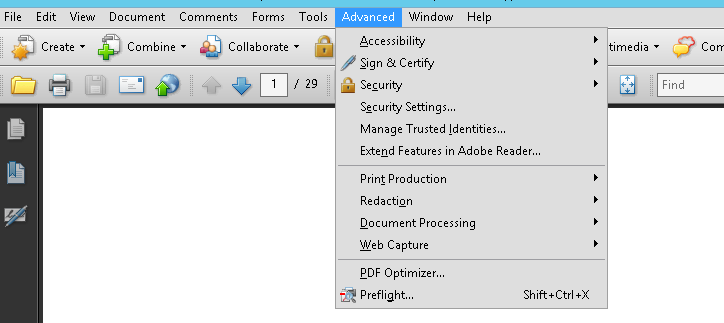
- Go to Advanced and select PDF Optimizer
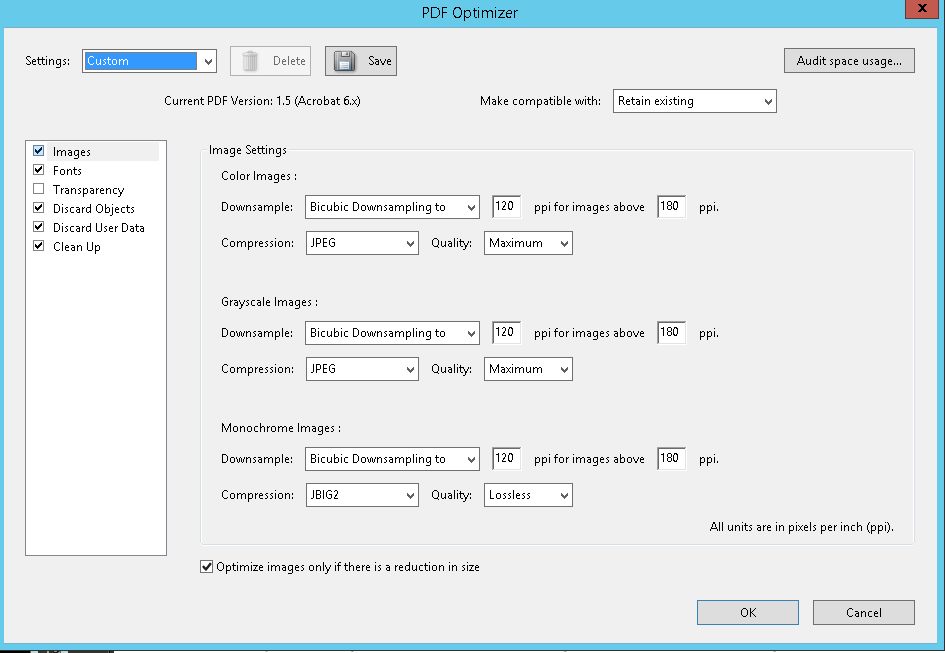
- If the PDF is mainly for viewing purpose on the Internet, use following settings:
- Save the file with a new filename.
No comments to display
No comments to display