
ACCESS
- URL: https://access.ifi.uzh.ch
- Login: SWITCH EDU-ID (email address)
Student: course assignment
- Course assignment happens via SWITCH EDU-ID.
- If you are missing a course on ACCESS, probably the link between SWITCH EDU-ID and MY is broken:
- (1) Verify the email under which ACCESS knows you: https://access.ifi.uzh.ch

- DO NOT CHANGE the SWITCH EDU-ID email address!!!
- (2) Log in on MY https://www.math.uzh.ch/my/ and go to your profile. Choose "Link further accounts" > "Switch Edu-Id" and follow the instructions.
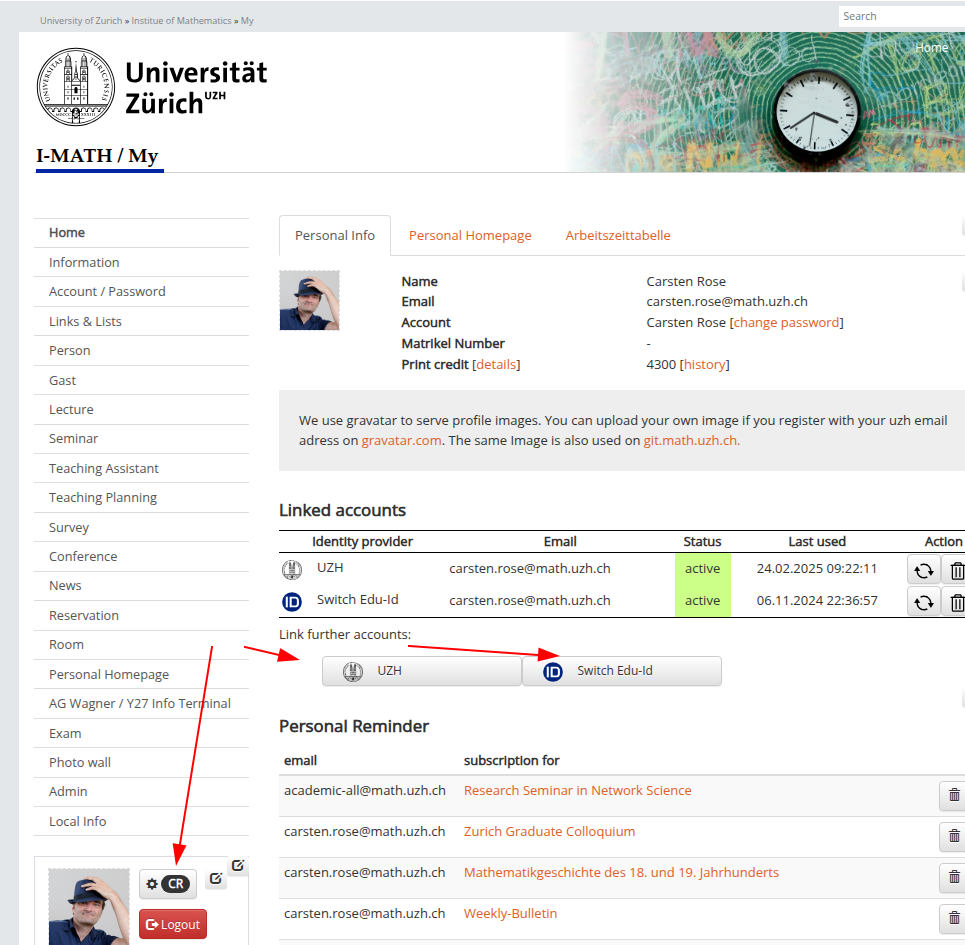
- Important: After changing the MY EDU-ID, wait until tomorrow 05:00, then try again.
Student: Unexpected error ...
- You've changed your SWITCH EDU-ID!
- Change the SWITCH EDU-ID back to the former one (probably something different than @uzh.ch), then try again to log in to ACCESS.
- If it still fails: Log in on MY https://www.math.uzh.ch/my > profile > Linked accounts > click the Refresh button.
- Important: After changing the MY EDU-ID, wait until tomorrow 05:00, then try again.
Types of Problems
FS24
- None
FS23
| Type | # | Description | FIX |
| Message: Unexpected error | 15 | User logs in to ACCESS and log out, than changed the EDU-ID on Switch, than again log in to ACCESS | Change the SWITCH EDU ID back to the original one |
| Page: no course shown | 45 | User uses a different EDU-ID in Switch than the UZH EMail | Configure the used SWITH EDU-ID in MY |
| User sees no 'run' button | 1 | User expects the run button at the bottom | The button is at the top |
| User sees no 'questions' | 1 | Course is listed but no questions shown | |
| Failed to start shim | 2 | Pressing RUN | Fixed |
No comments to display
No comments to display