
Overview-Print
Printing I-MATH vs. UZH Printplus (UPP)
At the institute there are two printing solutions available: I-MATH-based and UZH Printplus (UPP)-based.
| I-MATH | UPP | |
| Printer | All printers & copiers | Copiers k, kcolor and j, jcolor. Thinlinc Print Dialog: UZHPrintPlus |
| UZH wide | - | yes |
| Cost | Low. I-MATH pays the infrastructure | High. UZH |
| Scan | Only a few dedicated rooms (not public) | 'k / kcolor', 'j / jcolor' - use your UZH badge, free |
| Paying | see below | UZH Printplus |
Printing
Please review the specific page:
- UZH Printplus (UPP)
Printer Names
- Printers are named after the room they are in.
- For the big printers on corridors of J and K floors several virtual printers with various configurations are
providedprovided..For example: - jcolor = colored
Public printers
| Printer | Location | Color | Remarks |
|---|---|---|---|
| h52 | Y27 H52 | No | |
| j11 | Y27 J11 | No | |
| k49 | Y27 K49 | No | |
| k49color | Yes |
jcolor_booklet Yes Only booklet print
k K floor No Stapling, booklet print, A3 format kcolor Yes Stapling, booklet print, A3 format
kcolor_booklet Yes Only booklet print
Credit System
All printers of the institute are connected to a central print server, which logs and counts all print jobs. Before a print is sent to a printer, the system gets the page number and job settings, calculates the costs and checks permissions and credits for the sender. After a successful printing, the credits will be subtracted.
| Credits and free printing | black and white | color |
| members of the institute* | free | free** |
| students*** | costs | costs |
- Members of the institute are: Professors, Staff, Assistants (!PostDocs and !PhDs), Guests.
- Assistants need to refill the credit (for free) after printing 100 colored pages per semester.
- Students with 'Hauptfach Mathematik' or "Hauptfach Bio Statistic" get free credits worth 20 SFr. per semester. An I-MATH account is required to print.
- A printjob is counted based on page number, page format (A4 or A3), simplex or duplex and black/white or color.
- Special settings like A3, color or stapling are only available on some special printers like jcolor, k.
Prices for all printers with different settings!
Charging/Checking Credits
- You can view your credit, your settings and your last 50 print jobs in your account admin panel: My Math.
- Users can charge credits at the office Y27K30. The credit can be used immediately.
- Assistants can also write an email to the system support (support@math.uzh.ch), but in this case it can take a while until you receive the credit.
Booklets
Printers / Copiers 'jcolor' and 'kcolor' are capable to fold and stamp printouts to create booklets / brochures.
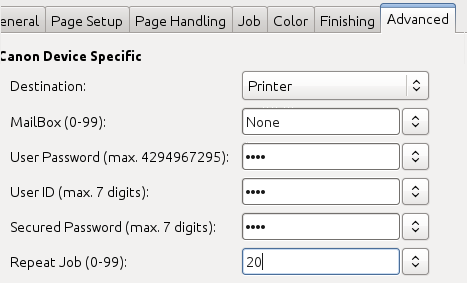
- Mulitple Copies: DO NOT USE 'copies' (print dialog or via commandline '-n num-copies'). Instead use 'Repeat jobs' under advanced options.
- Up to 16 sheets of paper can be stitched! If you have more they only get folded.
- Printing booklet with only folding (no stamps), might produce outputs where the single folded sheets of paper are one by one and not inserted into each other.
Poster Printing (large)
- ETHZ has outsourced most printing jobs, but you can still print large formats, see here: https://signprint.ch
and here for FAQ on ETHZ's decision to outsource etc: https://ethz.ch/staffnet/en/service/office-supplies-printing-and-mailing/print-publish/futureprint-eth.html - If you are looking for a nearby option: https://posterprinting.bioc.uzh.ch/