
Overview-Print
All printers of the institute are connected to a central print server, which logs and counts all print jobs. Before a print is sent to a printer, the system gets the page number and job settings, calculates the costs and checks permissions and credits for the sender. After a successful printing, the credits will be subtracted.
| Credits and free printing | black and white | color |
| members of the institute* | free | free** |
| students*** | costs | costs |
- Members of the institute are: Professors, Staff, Assistants (!PostDocs and !PhDs), Guests.
- Assistants need to refill the credit (for free) after printing 100 colored pages per semester.
- Students with 'Hauptfach Mathematik' or "Hauptfach Bio Statistic" get free credits worth 20 SFr. per semester. An I-MATH account is required to print.
- A printjob is counted based on page number, page format (A4 or A3), simplex or duplex and black/white or color.
- Special settings like A3, color or stapling are only available on some special printers like jcolor, k.
Prices for all printers with different settings!
Printing 'I-MATH' vs. 'UZH Printplus (UPP)'
At the institute there are two printing solutions available: 'I-MATH'-based and 'UZH Printplus (UPP)'-based.
| I-MATH | UPP | |
| Printer | All printers & copiers | Copiers 'kcolor' and 'jcolor'. Thinlinc Print Dialog: UZHPrintPlus |
| UZH wide | - | yes |
| Cost | Low. I-MATH pays the infrastructure | High. UZH |
| Scan | Only a few dedicated rooms (not public) | 'kcolor', 'jcolor' - use your UZH badge, free |
| Paying | see below | UZH Printplus |
Printing via Notebook / Desktop
Please review the specific page:
- UZH Printplus (UPP)
Check your current print credit
- log in to http://www.math.uzh.ch/my
- Switch to the printing tab
- You will see the current amount of credit you have left and your own print history.
Charging Credit
You can view your credit, your settings and your last 50 print jobs in your account admin panel: My Math.
Users can charge credits at the office !Y27K30. The credit can be used immediately.
Assistants can also write an email to the system support, but in this case probably have to wait some time until the credit is loaded up.
Printer Names
- Printers are named after the room they are in.
- For the big printers on corridors of J and K floors several virtual printers with various configurations are provided .
Public printers
| Printer | Location | Color | Remarks |
|---|---|---|---|
| h52 | Y27 H52 | No | |
| j11 | Y27 J11 | No | |
| k49 | Y27 K49 | No | |
| k49color | Yes | ||
| j | J floor | No | Stapling, booklet print, A3 format |
| jcolor | Yes | Stapling, booklet print, A3 format | |
| jcolor_booklet | Yes | Only booklet print | |
| j-ps | Yes | Advanced options (!PostScript printer), A3 format | |
| k | K floor | No | Stapling, booklet print, A3 format |
| kcolor | Yes | Stapling, booklet print, A3 format | |
| kcolor_booklet | Yes | Only booklet print | |
| k-ps | Yes | Advanced options (!PostScript printer), A3 format |
Booklets
Printers / Copiers 'jcolor' and 'kcolor' are capable to fold and stamp printouts to create booklets / brochures.
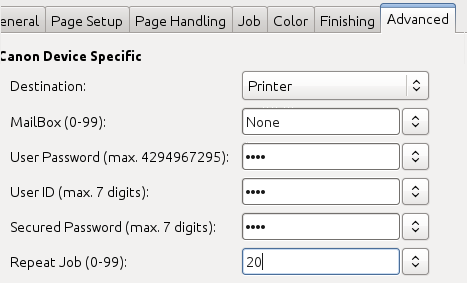
- Mulitple Copies: DO NOT USE 'copies' (print dialog or via commandline '-n num-copies'). Instead use 'Repeat jobs' under advanced options.
- Up to 16 sheets of paper can be stitched! If you have more they only get folded.
- Printing booklet with only folding (no stamps), might produce outputs where the single folded sheets of paper are one by one and not inserted into each other.
Poster Printing (large)
- ETHZ has outsourced most printing jobs, but you can still print large formats, see here: https://signprint.ch
and here for FAQ on ETHZ's decision to outsource etc: https://ethz.ch/staffnet/en/service/office-supplies-printing-and-mailing/print-publish/futureprint-eth.html