ProxyBySsh
To get Web access to the I-MATH intranet webserver it is possible to set up a SOCKS SSH proxy channel. This setting is not persistent, start it when you need it.
The proxy configuration can be done:
- on the OS - not described here.
- via commandline - described here for Google Chrome and Opera.
- inside the browser via GUI - described here for Firefox.
SSH Proxy
- Use SSH
- Linux & Mac OS X: preinstalled.
- Windows: https://www.howtogeek.com/336775/how-to-enable-and-use-windows-10s-built-in-ssh-commands/
- Linux & Mac OS X: preinstalled.
ssh -C -D 1080 -N -q <I-MATH account>@ssh.math.uzh.ch &
* Define an alias to use it as a onliner (kill's stale ssh proxy connections first)
alias google-chrome-math='OLD=`ps -ef | grep "ssh -C -D 1080 -N" | grep -v grep | awk "{ print \\$2 }"`; for II in $OLD; do kill $II; done; (ssh -C -D 1080 -N -q ssh.math.uzh.ch & ); google-chrome --proxy-server="socks5://localhost:1080"'
Browser
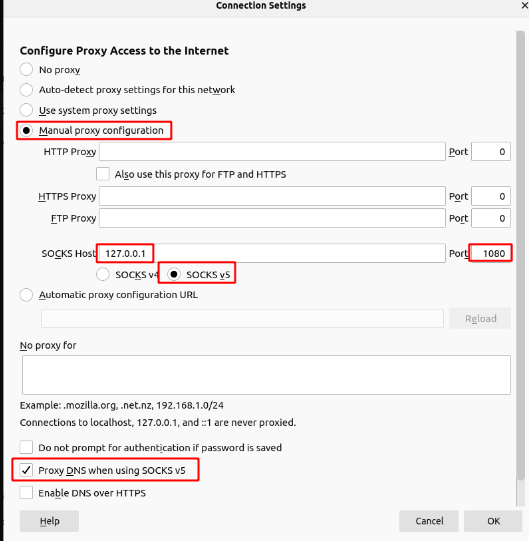
To use the I-MATH internal DNS Server (necessary to get access to hostnames that are only known inside of I-MATH), use the SOCKS5 protocol incl. DNS forward.
For Google Chrome or Opera, open a second terminal and type the following command.
google-chrome --proxy-server="socks5://localhost:1080"Mac OS X:
/Applications/Google\ Chrome.app/Contents/MacOS/Google\ Chrome --proxy-server="socks5://localhost:1080"
Opera
Linux: opera --proxy-server="socks5://localhost:1080"Mac OS X:
/Applications/Opera.app/Contents/MacOS/Opera --proxy-server="socks5://localhost:1080"
- Firefox
- There is no official option '-proxy-server' for the command line
- Start firefox, open 'settings', navigate to 'network' > see screenshot
- There is no official option '-proxy-server' for the command line
FAQ
- Q: Can I configure Google Chrome / Opera via GUI like Firefox
- A: yes - just check the 'network' seetings.
- A: This is a very quick way to use the proxy. If you do not need it, start the browser via mouse.
- A: yes. A small bash script should do the trick:
{{{#!sh
#!/bin/bash
nohup google-chrome --proxy-server="socks5://localhost:1080" & ssh -C -D 1080 @ssh.math.uzh.ch
}}}
- Check SSH Keys to setup password less SSH login.
- Q: in Firefox I don't like to toggle the proxy on/off all the time - is there a better way?
- A: Create an additional profile 'proxy'. Start Firefox via Terminal
firefox -P, create the profile, use it and do the proxy config there.
- A: Create an additional profile 'proxy'. Start Firefox via Terminal
Advanced Setup: Google Chrome Proxy Switch
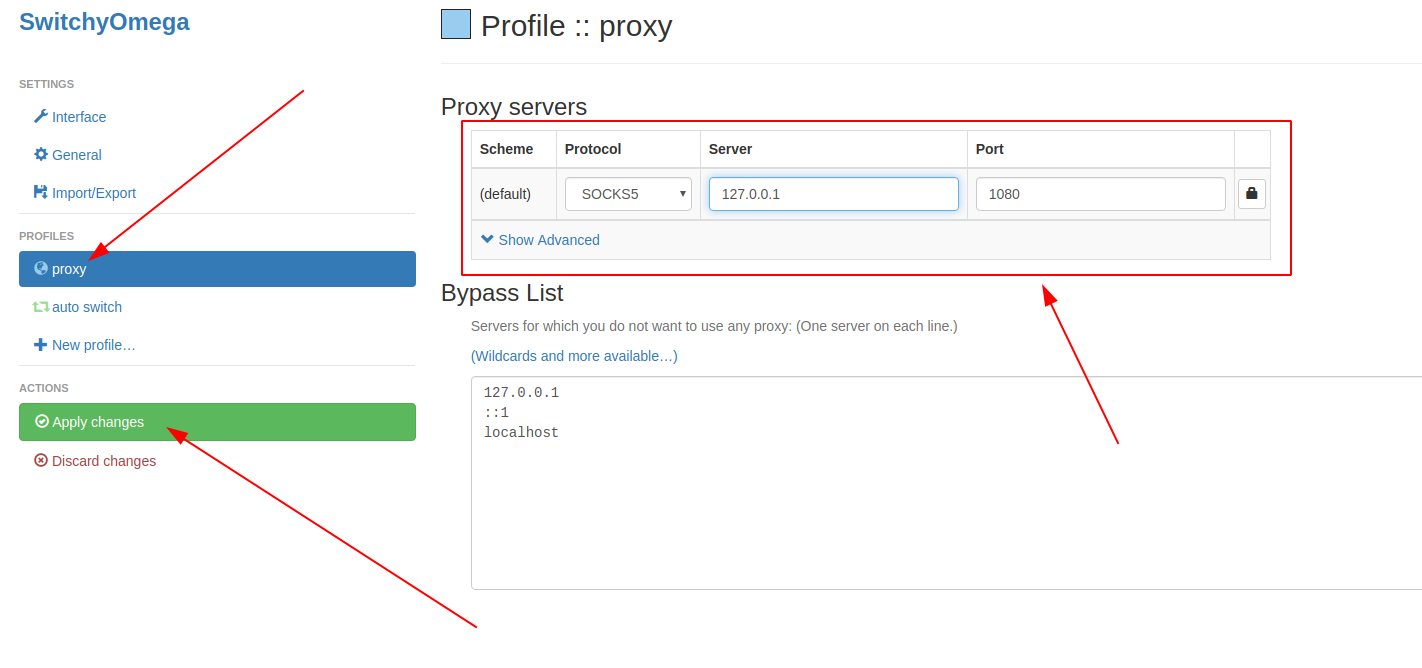
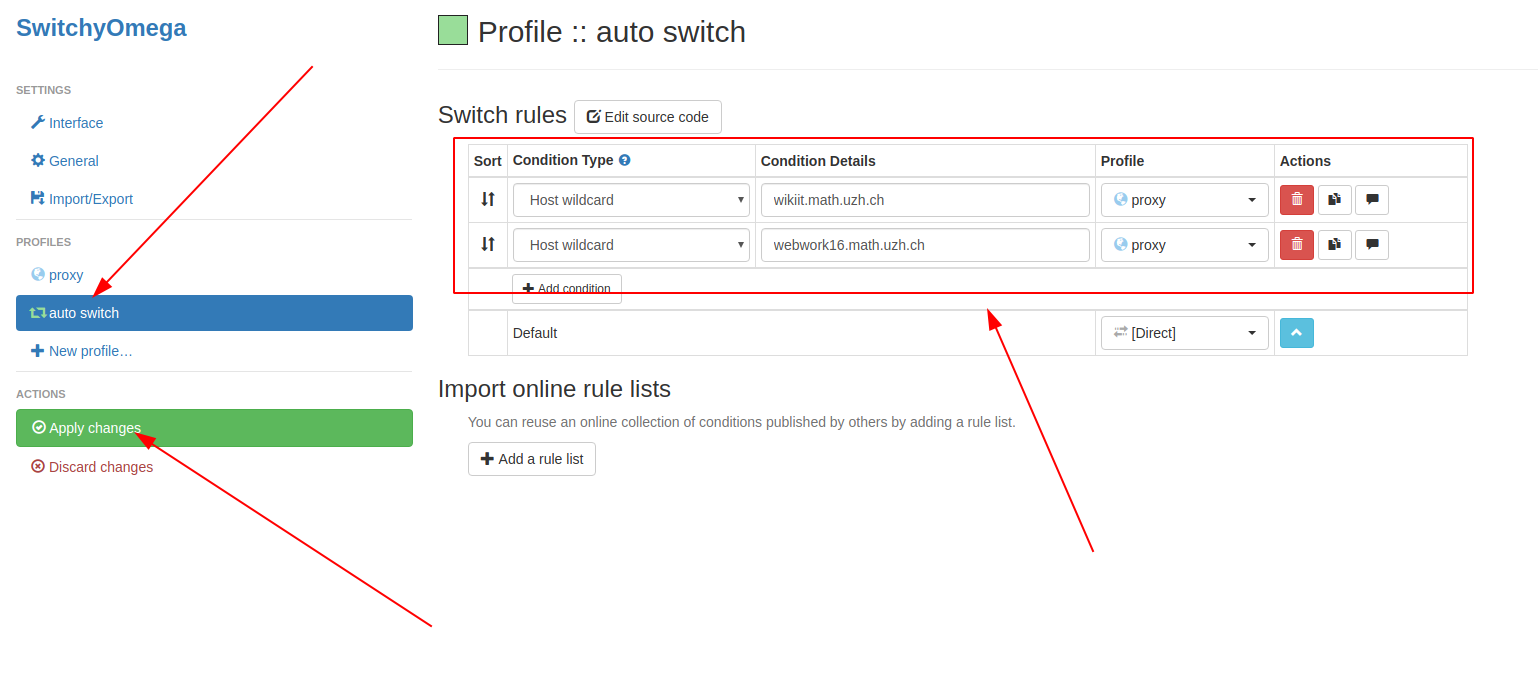
Install and configure the Google Chrome extension SwitchyOmega to automatically switch proxy for certain URLs.
Configurations: