|
Size: 403
Comment:
|
Size: 1759
Comment:
|
| Deletions are marked like this. | Additions are marked like this. |
| Line 2: | Line 2: |
== Vidyo == * One User needs an AAI Account. * Logon: [[http://www.swicht.ch/de/videoconf]] * Send invitations to all conference participants (Devices: H323, Desktop, Mobile - all mixes are possible). * Live video and screen sharing. * Easy setup * For Multipoint conferences better than Skype == Various services == |
|
| Line 6: | Line 16: |
| * Lotus Sametime | |
| Line 8: | Line 19: |
| * Skype (only with monthly subscription) | * Skype |
| Line 10: | Line 21: |
| * TeamViewer (free for private use) | * Teamviewer (free for private use) |
| Line 14: | Line 25: |
| * | * One notebook: skype interview call and screen sharing on the same notebook. * Two notebooks: skype interview on the first notebook, screen sharing on the second notebook. == Skype == * Exchange the Skype usernames. * Do a Skype testcall short before the interview - this helps skype to adjust the audio quality algorithm. * In case of audio quality problems: try to talk as much as possible - the audio quality algorithm try to find the best settings during the whole call - this only works if there is enough sound. == Screen Sharing: Teamviewer == === Preparation === * http://www.teamviewer.com * Host: Install the full version. * Speaker: Install runtime or full version. |
| Line 16: | Line 39: |
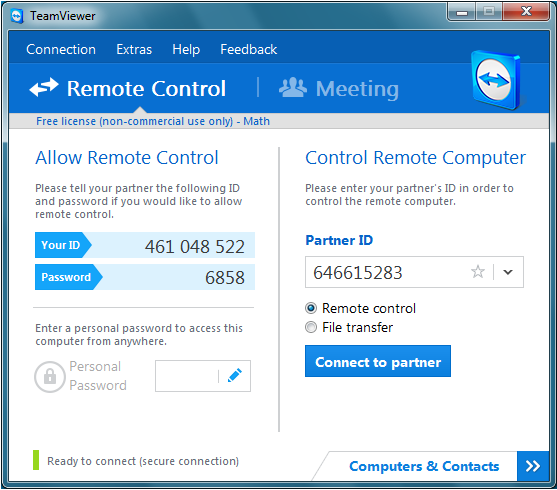
| === Interview === * Speaker starts Teamviewer and submit the '''ID''' (9 digits) and the '''Password''' (4 digits) to the host - best by skype chat (copy paste). * Host starts Teamviewer * As 'Partner ID' provide in the 'Speaker ID' > 'Connect to partner' > Password: 'the one from the speaker' {{attachment:teamviewer.png}} |
Interview: video call & screen sharing (for presentation)
Vidyo
- One User needs an AAI Account.
- Send invitations to all conference participants (Devices: H323, Desktop, Mobile - all mixes are possible).
- Live video and screen sharing.
- Easy setup
- For Multipoint conferences better than Skype
Various services
- Video Call - options:
- Skype (recommended)
- ooVoo
- Adobe Connect
- Lotus Sametime
- Screen sharing - options:
- Skype
- Adobe Connect (RTSP Port not blocked by firewall)
- Teamviewer (free for private use)
- Lotus Sametime (Java required)
Example Setup: Skype and TeamViewer
- One notebook: skype interview call and screen sharing on the same notebook.
- Two notebooks: skype interview on the first notebook, screen sharing on the second notebook.
Skype
- Exchange the Skype usernames.
- Do a Skype testcall short before the interview - this helps skype to adjust the audio quality algorithm.
- In case of audio quality problems: try to talk as much as possible - the audio quality algorithm try to find the best settings during the whole call - this only works if there is enough sound.
Screen Sharing: Teamviewer
Preparation
- Host: Install the full version.
- Speaker: Install runtime or full version.
Interview
Speaker starts Teamviewer and submit the ID (9 digits) and the Password (4 digits) to the host - best by skype chat (copy paste).
- Host starts Teamviewer
As 'Partner ID' provide in the 'Speaker ID' > 'Connect to partner' > Password: 'the one from the speaker'