
|
Size: 724
Comment:
|
Size: 980
Comment:
|
| Deletions are marked like this. | Additions are marked like this. |
| Line 23: | Line 23: |
== Problems == * Q: No sync at all: * A: Check that the Nextcloud Client is fine. Quit the client and restart it (on all computers). * Q: Outdated notes: * A: Nextcloud might have a problem. Check 'Activity' in the nextcloud client. |
Tomboy Notes
- Small app to organize personal notes.
- Notes can be linked inside notes.
- Notes can be synchronized.
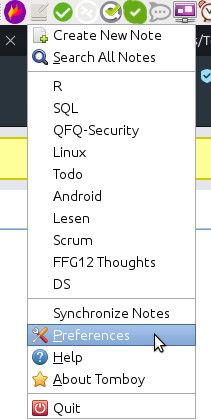
Thinlinc: Applications > Accessories > Tomboy Notes
Linux: apt install tomboy
Synchronize
Install and configure any cloud storage like https://drive.math.uzh.ch, https://drive.switch.ch, Dropbox.
Create a directory like ~/Nextcloud/Tomboy (Nextcloud.imath is the personal cloud storage directory).
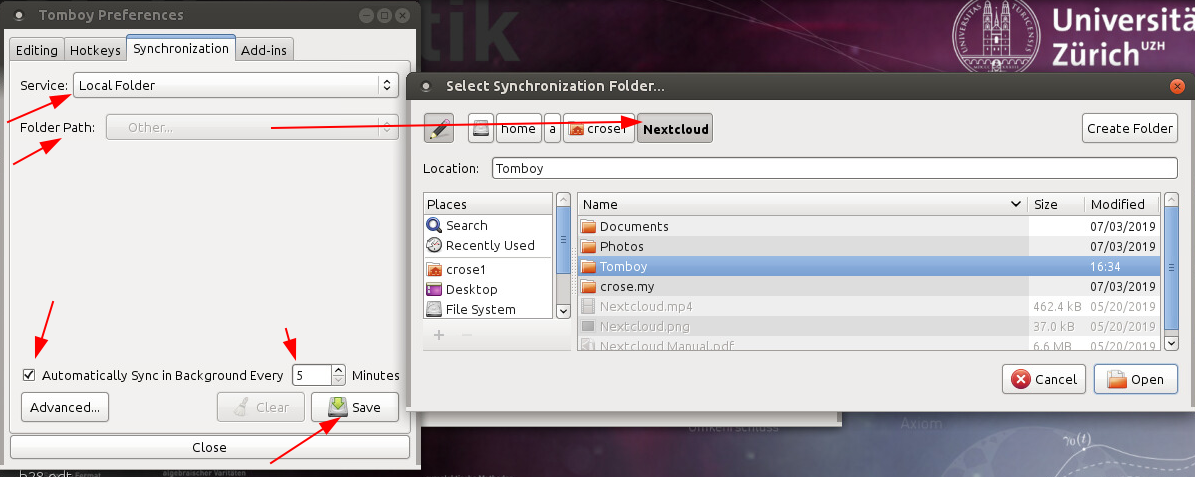
Open Preferences > Synchronization
- Configure:
- Service: Local Folder
Folder Path: ~/Nextcloud/Tomboy
Problems
- Q: No sync at all:
- A: Check that the Nextcloud Client is fine. Quit the client and restart it (on all computers).
- Q: Outdated notes:
- A: Nextcloud might have a problem. Check 'Activity' in the nextcloud client.