|
Size: 849
Comment:
|
Size: 1332
Comment:
|
| Deletions are marked like this. | Additions are marked like this. |
| Line 3: | Line 3: |
| You can find the Rocket Chat application under Applications > Internet > Rocket.Chat | <<TableOfContent>> You can find the Rocket.Chat application under Applications > Internet > Rocket.Chat or via the homepage https://hello.math.uzh.ch Differences: * App * (+) Voice Chat, Video Chat and Screensharing work out of the box * (+) Notification in Panel * Webpage * (+) No installation required * (-) For Screensharing you need to use Chrome and install an Extension The App is available for Windows, Mac OS X, Linux, Android and iOS. |
| Line 7: | Line 19: |
| Clicking on the Globe Symbol (Directory) displays the list of all public channels. By clicking on one of those groups, you will see the active conversation and can join it by clicking on the JOIN button at the end. | * Clicking on the Globe Symbol (Directory) displays the list of all public channels. {{attachment:globe.png}} |
| Line 9: | Line 22: |
| == Channel == | * By clicking on one of those groups, you will see the active conversation and can join it by clicking on the JOIN button at the end. {{attachment:directory.png}} |
| Line 11: | Line 25: |
| Inside a channel, you can click on the three dots at the top right corner, which opens a list of various options. | * Inside a channel, you can click on the three dots at the top right corner, which opens a list of various options and special views, the important one are outlined in the following chapters. {{attachment:more.png}} |
| Line 13: | Line 28: |
| * File List * See all the files that are uploaded to the channels * Mentions * See everyone that tagged you in their own message by writing @yourUsername * Starred Messages * If you want to remember a message for later, you can star it by clicking on the 3 dots at the right side of the message and choosing Star Message {{attachement:star.png}} |
=== Mentions === You can mention a person by writing @username. Mentions are === Starred Messages === If you want to remember a message for later, you can star it by clicking on the 3 dots at the right side of the message and choosing Star Message, see Screenshot below. {{attachment:star.png}} |
Rocket Chat
<<TableOfContent>>
You can find the Rocket.Chat application under Applications > Internet > Rocket.Chat or via the homepage https://hello.math.uzh.ch
Differences:
- App
- (+) Voice Chat, Video Chat and Screensharing work out of the box
- (+) Notification in Panel
- Webpage
- (+) No installation required
- (-) For Screensharing you need to use Chrome and install an Extension
The App is available for Windows, Mac OS X, Linux, Android and iOS.
Channels
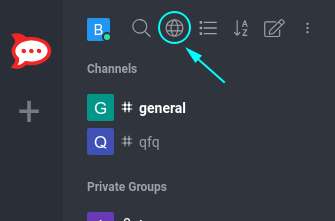
- Clicking on the Globe Symbol (Directory) displays the list of all public channels.
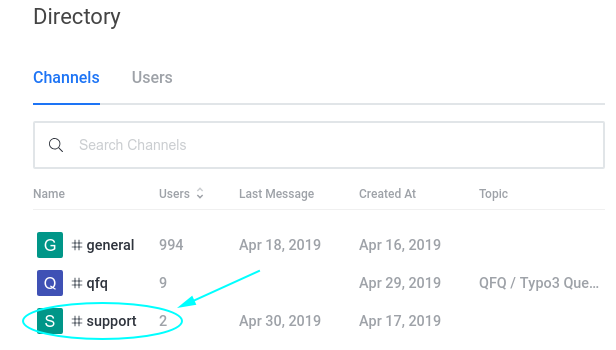
- By clicking on one of those groups, you will see the active conversation and can join it by clicking on the JOIN button at the end.
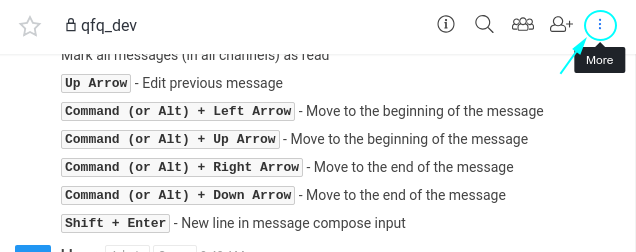
- Inside a channel, you can click on the three dots at the top right corner, which opens a list of various options and special views, the important one are outlined in the following chapters.
Mentions
You can mention a person by writing @username. Mentions are
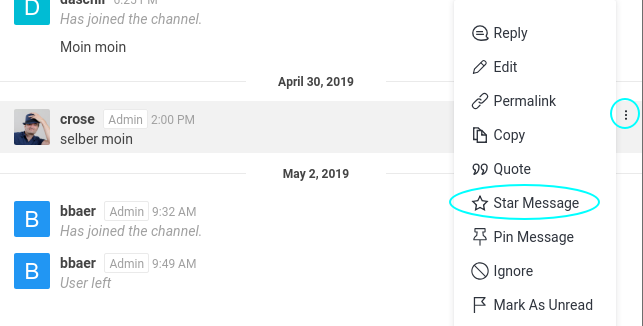
Starred Messages
If you want to remember a message for later, you can star it by clicking on the 3 dots at the right side of the message and choosing Star Message, see Screenshot below.