|
Size: 492
Comment:
|
← Revision 8 as of 2021-02-03 08:14:19 ⇥
Size: 495
Comment:
|
| Deletions are marked like this. | Additions are marked like this. |
| Line 2: | Line 2: |
| On the new NUC's Thinlic the compose Key is may not available. Please follow the instructions below to enable it: | On the new NUC's Thinlic, the compose Key is may be not available. Please follow the instructions below to enable it: |
| Line 6: | Line 6: |
| 1. select the tab "Layout | 1. select the tab "Layout" |
| Line 8: | Line 8: |
| * select " Keyboard model" i.e. "Generic 105-key" | * select "Keyboard model" i.e. "Generic 105-key" |
| Line 11: | Line 11: |
| {{attachment:IMG_20190604_151309.jpg}} {{attachment:IMG_20190604_151301.jpg}} |
{{attachment:IMG_20190604_151309.jpg}} {{attachment:IMG_20190604_151301.jpg}} |
enable Compose Key
On the new NUC's Thinlic, the compose Key is may be not available. Please follow the instructions below to enable it:
- click F8 and untick "Full Screen"
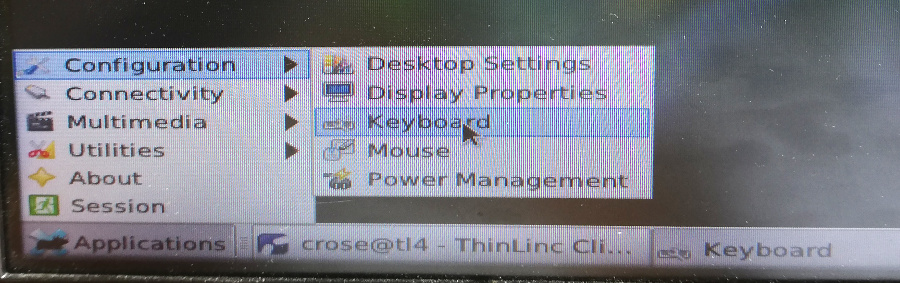
on the right corner click Applications-> Configuration -> Keyboard
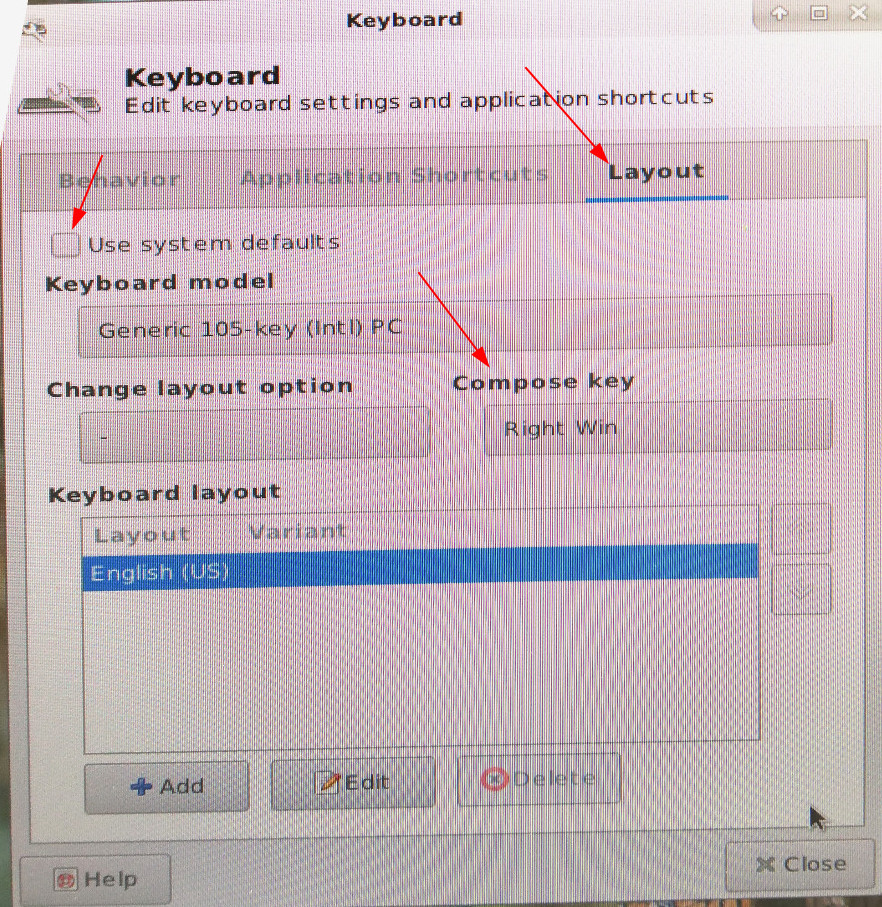
- select the tab "Layout"
- untick "Use system defaults"
- select "Keyboard model" i.e. "Generic 105-key"
- select "Compose Key" i.e. "Right Win"