
Overview
| Name | Username | Password | Notes |
|---|---|---|---|
| uzh, uzh-5GHZ | (change) | UZH Campus. EAP-Method: PEAP Phase 2 Auth: MSCHAPV2 CA certificate: no validate | |
| eduroam | .@math.uzh.ch (shortname won't work any longer) | (change) | Highschools worldwide, Doc ZI EAP-Method: PEAP Phase 2 Auth: MSCHAPV2 CA certificate: no validate |
| uzh-guest | none | provide your mobile phone number | UZH Campus, valid for 24h |
- ZI Documentation: https://www.zi.uzh.ch/en/support/network/wireless.html
WLAN Accounts
- UZH Member: automatically created by ID
- Guests / Conferences:
- Using Eduroam (account provided by their home organisation)
- No Eduroam account: WLAN 'uzh-guest' - you have to provide your mobile number to get the password via SMS.
Eduroam
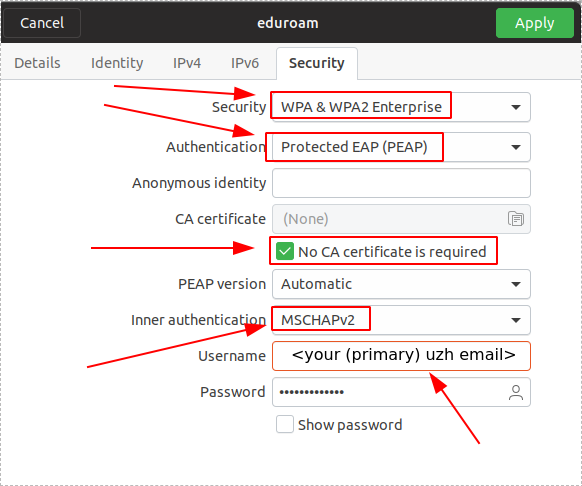
- Username: Your UZH Mailadress
- Password: Your UZH Password
- EAP-Method: PEAP
- Phase 2 Auth: MSCHAPV2
- CA certificate: no validate
Problems?
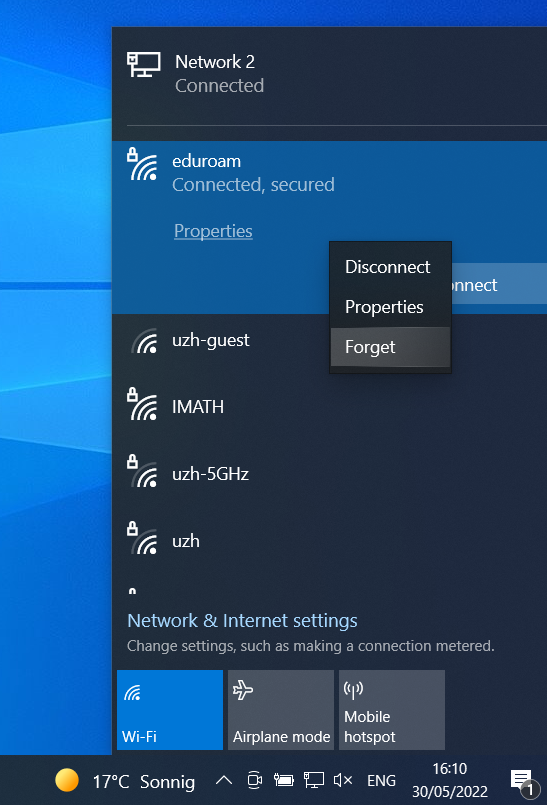
If there are problems to connect to eduroam, please purge the old eduroam settings and configure eduroam again.
Under Windows, right click on the WLAN and choose Forget
Linux
Notes:
- since 5.06.2024 the username is your primary UZH email address. For most of I-MATH member this is .@math.uzh.ch.
- If a domain is required, use uzh.ch