Skip to main content
tomboy
- Small app to organize personal notes.
- Notes can be linked to notes.
- Notes can be synchronized.
- URL: https://wiki.gnome.org/Apps/Tomboy
- Thinlinc:
Applications > Accessories > Tomboy Notes
Synchronize
- Install and configure any cloud storage like drive.math.uzh.ch, drive.switch.ch, Dropbox.
- Create a directory like
~/Nextcloud/Tomboy (Nextcloud is the personal cloud storage directory).
- Open
Preferences > Synchronization
[image: tomboy-pref.jpg]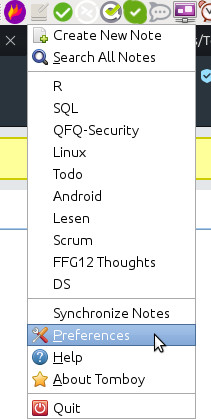
[image: tomboy-sync.png]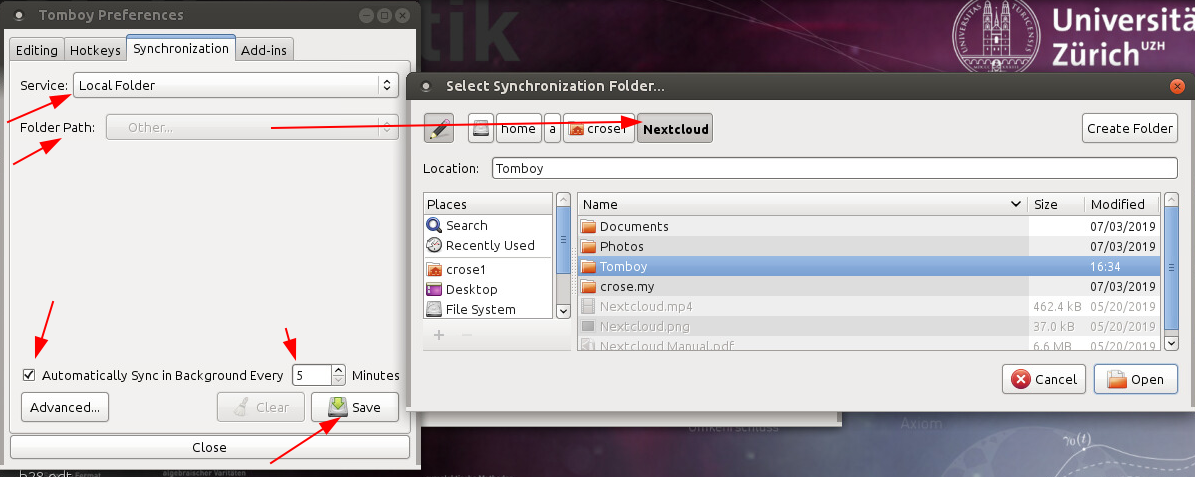
Problems
- Q: No sync at all:
- A: Check that the Nextcloud Client is fine. Quit the client and restart it (on all computers).
- Q: Outdated notes:
- A: Have you waited 5 + 5 minutes?
- A: Nextcloud might have a problem. Check 'Activity' in the nextcloud client (on all computer: a changed file should appear).
