
|
Size: 39
Comment:
|
← Revision 31 as of 2026-04-24 08:35:57 ⇥
Size: 3791
Comment:
|
| Deletions are marked like this. | Additions are marked like this. |
| Line 1: | Line 1: |
| = Office 365 = | <<TableOfContents>> = MS Outlook = * URL: https://outlook.office365.com * To login, use your email address and password from Active Directory account (typically like the WLAN password). * FAQ: https://www.zi.uzh.ch/en/support/it-workplace/ms365/outlook/faq.html * If you login the first time, you have to configure a second factor to authenticate - [[MFA/Microsoft_Authentication]] * To do the outlook forward configuration, please follow [[https://www.zi.uzh.ch/en/support/it-workplace/ms365/outlook/faq.html|FAQ]] > 2.) Forwarding == Out of Office == * https://wiki.math.uzh.ch/public/email/vacation_ooo_out_of_office == Open another mailbox == {{attachment:outlook-su01.png}} {{attachment:outlook-su02.png}} |
| Line 4: | Line 24: |
Setting up an email forward in Office 365 (Outlook) via Webinterface. * Log in to https://outlook.office365.com * As Email address use your regular ....@math.uzh.ch address * The password is probably the same at I-MATH or for your UZH/Eduroam WLAN account. * If you have problems to login: you can set a new password under https://identity.uzh.ch * Go to `Settings > View all Outlook settings` {{attachment:m365forward.01.png}} * Go to `Mail > Forwarding` {{attachment:m365forward03.png}} * Check: `Enable Forwarding` * Specify the final address. * If you forward to the I-MATH internal mail server, do '''not''' use your regular email, instead insert ''mail.'' between ''@'' and ''math.uzh.ch''. Example:''firstname.lastname@'''mail'''.math.uzh.ch'' * Check: `Keep a copy of forwarded message` == Shared Accounts im Outlook Webinterface anzeigen == {{attachment:outlook.admin-accounts.png}} == Thunderbird == * https://www.zi.uzh.ch/de/support/Outlook-und-Kollaboration-Office-365/outlook/faq.html * Siehe: (12.) IMAP-Clients (z.B. Thunderbird) * Es gibt auch eine dedizierte Anleitung fuer die Konfiguration von geteilten Mailboxen. [[https://www.zi.uzh.ch/dam/jcr:89d814eb-eeb3-44b0-aa7f-f7b39c473114/Anleitung_TB_MailIn_Mac-5.pdf|PDF]] * Step by step: https://uit.stanford.edu/service/office365/configure/thunderbird-oauth2 == MFA Setup == * https://wiki.math.uzh.ch/public/MFA = Outlook for Mac: Realname = * Beim anlegen des IMAP Kontos: bei der Anmeldung „Synchronisation mit Microsoft Konto“ ausschalten. Danach kann beim Konto der Realname geändert werden. = Outlook / Citrix = == Shared Mailbox anzeigen == * Doku: https://support.microsoft.com/en-us/office/open-and-use-a-shared-mailbox-in-outlook-d94a8e9e-21f1-4240-808b-de9c9c088afd#picktab=classic_outlook * Eigentlich sollten shared mailboxes direkt angezeigt werden. * Ist das nicht / nur teilweise der Fall kann unter (Classic Outlook, Link s.o.) weitere Accounts hinzugefuegt werden. == New Mail: 'From' automatically selected by current selected mailbox == If there are multiple email adresses configured and a new email is created: it would be nice if 'from' points automatically to the last selected email account. According to Microsoft, this is not supported by Outlook ([[https://support.microsoft.com/en-us/office/change-the-account-used-to-send-email-messages-2bdd8d4f-e30f-4ec8-88a0-406ce7b23cc5|Link]]). == Why is the 'From' button missing? == See: [[https://support.microsoft.com/en-us/office/change-the-account-used-to-send-email-messages-2bdd8d4f-e30f-4ec8-88a0-406ce7b23cc5|Link]] == Saving mail in drafts folder of the current email account == * Short: only with extra effort. * Long: https://learn.microsoft.com/en-us/answers/questions/5490248/drafts-are-saving-to-my-drafts-folder-instead-of-m == 'Reply All' should not include myself == * Currently we don't know if this is an option. |
MS Outlook
- To login, use your email address and password from Active Directory account (typically like the WLAN password).
FAQ: https://www.zi.uzh.ch/en/support/it-workplace/ms365/outlook/faq.html
If you login the first time, you have to configure a second factor to authenticate - MFA/Microsoft_Authentication
To do the outlook forward configuration, please follow FAQ > 2.) Forwarding
Out of Office
Open another mailbox
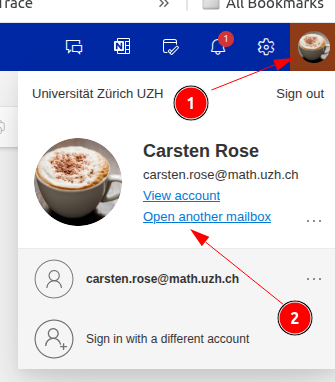
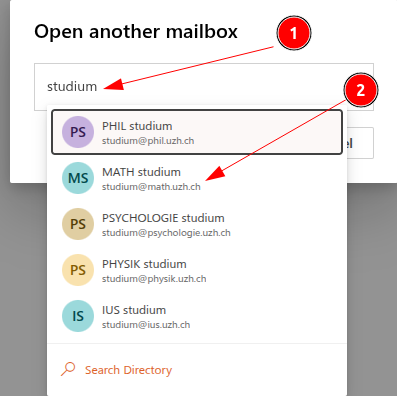
Email forward
Setting up an email forward in Office 365 (Outlook) via Webinterface.
Log in to https://outlook.office365.com
As Email address use your regular ....@math.uzh.ch address
- The password is probably the same at I-MATH or for your UZH/Eduroam WLAN account.
If you have problems to login: you can set a new password under https://identity.uzh.ch
Go to Settings > View all Outlook settings
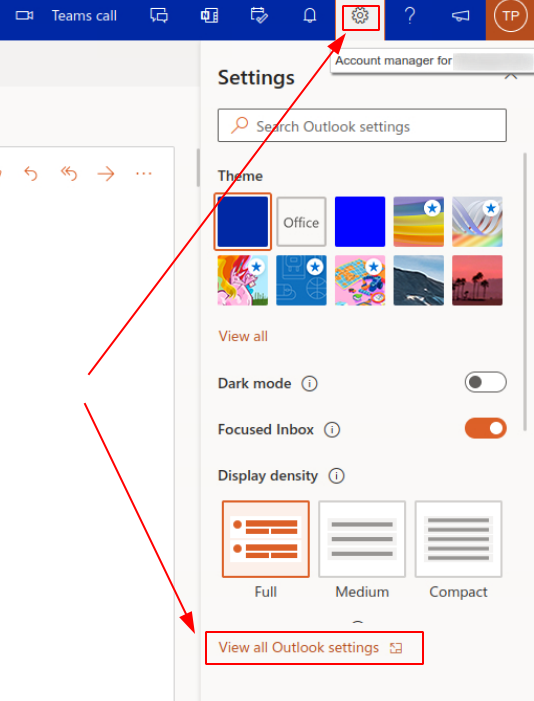
Go to Mail > Forwarding
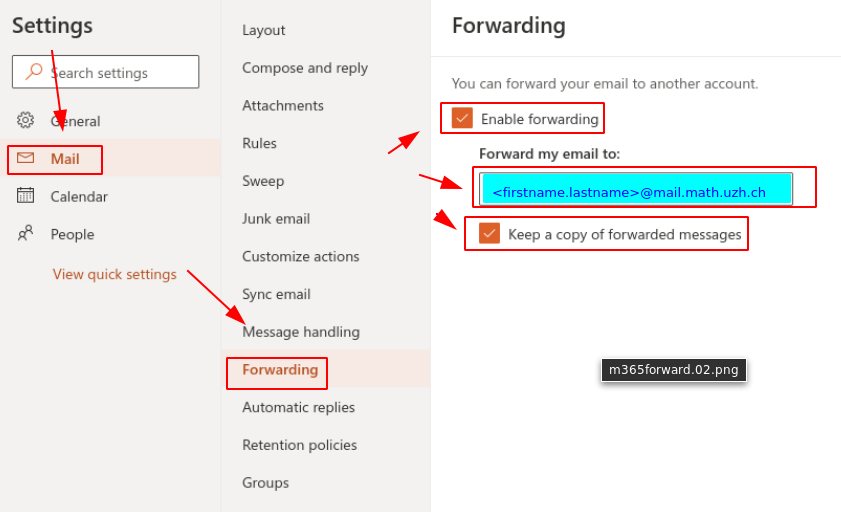
Check: Enable Forwarding
- Specify the final address.
If you forward to the I-MATH internal mail server, do not use your regular email, instead insert mail. between @ and math.uzh.ch. Example:firstname.lastname@mail.math.uzh.ch
Check: Keep a copy of forwarded message
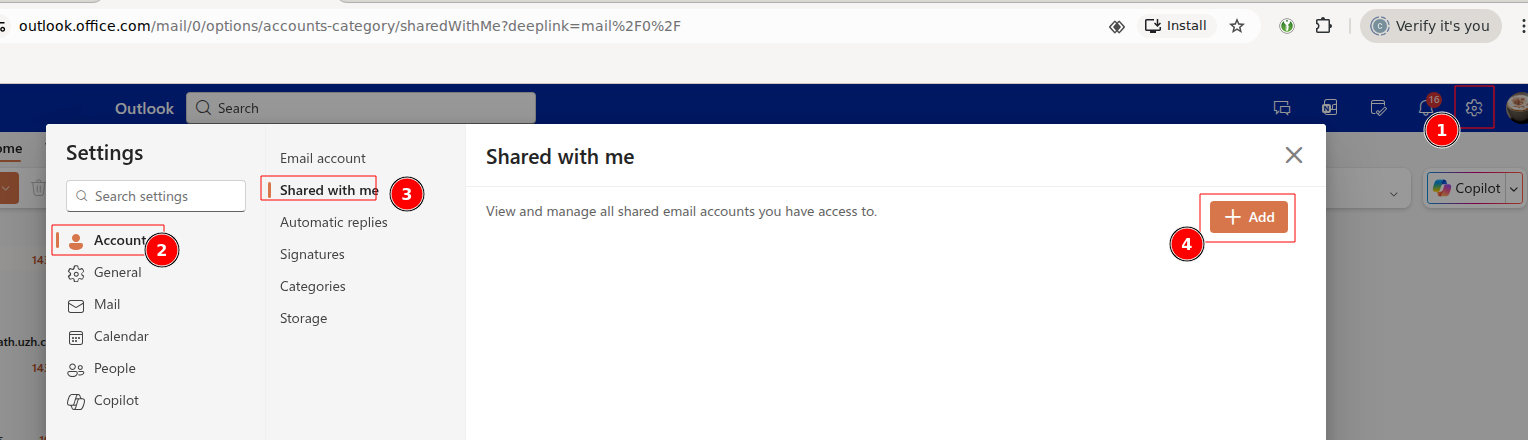
Shared Accounts im Outlook Webinterface anzeigen
Thunderbird
https://www.zi.uzh.ch/de/support/Outlook-und-Kollaboration-Office-365/outlook/faq.html
- Siehe: (12.) IMAP-Clients (z.B. Thunderbird)
Es gibt auch eine dedizierte Anleitung fuer die Konfiguration von geteilten Mailboxen. PDF
Step by step: https://uit.stanford.edu/service/office365/configure/thunderbird-oauth2
MFA Setup
Outlook for Mac: Realname
- Beim anlegen des IMAP Kontos: bei der Anmeldung „Synchronisation mit Microsoft Konto“ ausschalten. Danach kann beim Konto der Realname geändert werden.
Outlook / Citrix
Shared Mailbox anzeigen
- Eigentlich sollten shared mailboxes direkt angezeigt werden.
- Ist das nicht / nur teilweise der Fall kann unter (Classic Outlook, Link s.o.) weitere Accounts hinzugefuegt werden.
New Mail: 'From' automatically selected by current selected mailbox
If there are multiple email adresses configured and a new email is created: it would be nice if 'from' points automatically to the last selected email account.
According to Microsoft, this is not supported by Outlook (Link).
Why is the 'From' button missing?
See: Link
Saving mail in drafts folder of the current email account
- Short: only with extra effort.
'Reply All' should not include myself
- Currently we don't know if this is an option.