|
Size: 791
Comment:
|
Size: 827
Comment:
|
| Deletions are marked like this. | Additions are marked like this. |
| Line 11: | Line 11: |
| = Configuration Linux (Ubuntu) = | = Configuration Linux (Ubuntu 11.04) = |
| Line 14: | Line 14: |
| * Open the network manager: | * Open the network manager and choose `uzh` or `eduroam`: |
Wireless - WLAN
Networks: Choose uzh or eduroam
Configuration Windows / MacOS
http://www.id.uzh.ch/dl/mobil/wlan/Angebot/konfig-uzh.html
Choose: Windows: Konfiguration (PDF, 588 KB)
Choose: Mac OS X: Konfiguration (PDF, 368 KB)
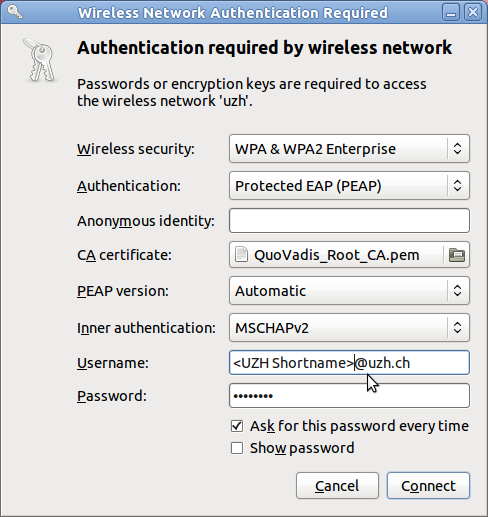
Configuration Linux (Ubuntu 11.04)
If not happened, install the necessary certificates with sudo apt-get install ca-certificates at the command line or by using the Synaptic package manager and installing the package ca-certificates.
Remove any network cable.
Open the network manager and choose uzh or eduroam: