
|
Size: 1368
Comment:
|
Size: 1596
Comment:
|
| Deletions are marked like this. | Additions are marked like this. |
| Line 3: | Line 3: |
| ||<rowbgcolor="#dddddd">Name||Organised by||Username|| Password || Access to IMATH printer || Notes || || uzh || UZH || <uzh shortname> || <ITIM WLAN PW> ([[https://www.identity.uzh.ch|change]]) || - || UZH Campus || || eduroam || UZH || <uzh shortname>@uzh.ch || <ITIM WLAN PW> ([[https://www.identity.uzh.ch|change]]) || - || Highschools worldwide || || imath || I-MATH || <I-MATH Account> || <I-MATH Account PW> || (./) || Only '''Guest Rooms''' (Y27 J28/K11/K28) I-MATH, secure, not very strong || |
||<rowbgcolor="#dddddd">Name||Username|| Password || Notes || || uzh, uzh-5GHZ|| <shortname> || <ITIM WLAN PW> ([[https://www.identity.uzh.ch|change]]) || UZH Campus || || eduroam || <firstname>.<lastname>'''@math.uzh.ch'''<<BR>>''(shortname won't work any longer)'' || <ITIM WLAN PW> ([[https://www.identity.uzh.ch|change]]) || Highschools worldwide, [[https://www.zi.uzh.ch/de/support/netzwerk/eduroam.html|Doc ZI]] || || uzh-guest || ''none'' || provide your mobile phone number || UZH Campus, valid for 24h || * ZI Documentation: https://www.zi.uzh.ch/en/support/network/wireless.html <<TableOfContents>> |
| Line 11: | Line 15: |
| * Guests: | * Guests / Conferences: |
| Line 13: | Line 17: |
| * No Eduroam account: WLAN 'imath' or UZH WLAN 24h account ([[http://www.id.uzh.ch/dl/mobil/Gast-WLAN.html|create]]). * Conferences * Using Eduroam (account provided by their home organisation) * No Eduroam account: UZH WLAN 24h account ([[http://www.id.uzh.ch/dl/mobil/Gast-WLAN.html|create]]). |
* No Eduroam account: WLAN 'uzh-guest' - you have to provide your mobile number to get the password via SMS. |
| Line 18: | Line 19: |
| = Details = | = Eduroam = |
| Line 20: | Line 21: |
| <<Tree>> | * Username: Your UZH Mailadress * Password: Your UZH Password * Certificate: No Certificate |
| Line 22: | Line 25: |
| = EAPSIM = {{{#!wiki red/solid WLAN 'Public': If you choose WLAN 'EAPSIM', you'll have trouble to come back to WLAN 'Public'. Try to open the page '''http://mpp.uzh.ch'''. }}} |
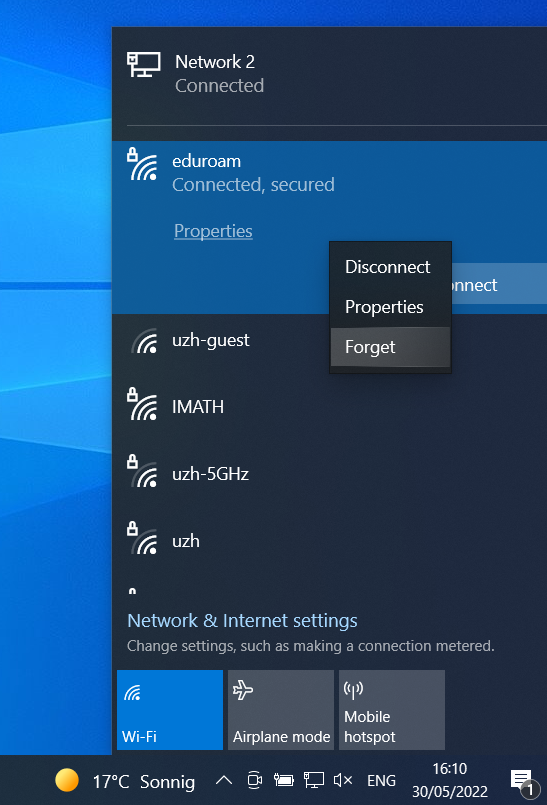
== Trouble == If there are problems to connect to ''eduroam'', please purge the old ''eduroam'' settings and configure ''eduroam'' again. Under Windows, right click on the WLAN and choose '''Forget''' {{attachment:wlan-forget.PNG}} == Linux == {{attachment:wlan-linux.png}} '''Notes:''' - since 5.06.2024 the username is your primary UZH email address. For most of I-MATH member this is <firstname>.<lastname>@math.uzh.ch. - If a domain is required, use ''uzh.ch'' |
WLAN at I-MATH / Campus
Name |
Username |
Password |
Notes |
uzh, uzh-5GHZ |
<shortname> |
<ITIM WLAN PW> (change) |
UZH Campus |
eduroam |
<firstname>.<lastname>@math.uzh.ch |
<ITIM WLAN PW> (change) |
Highschools worldwide, Doc ZI |
uzh-guest |
none |
provide your mobile phone number |
UZH Campus, valid for 24h |
ZI Documentation: https://www.zi.uzh.ch/en/support/network/wireless.html
WLAN Accounts
- UZH Member: automatically created by ID
- Guests / Conferences:
- Using Eduroam (account provided by their home organisation)
- No Eduroam account: WLAN 'uzh-guest' - you have to provide your mobile number to get the password via SMS.
Eduroam
- Username: Your UZH Mailadress
- Password: Your UZH Password
- Certificate: No Certificate
Trouble
If there are problems to connect to eduroam, please purge the old eduroam settings and configure eduroam again.
Under Windows, right click on the WLAN and choose Forget
Linux
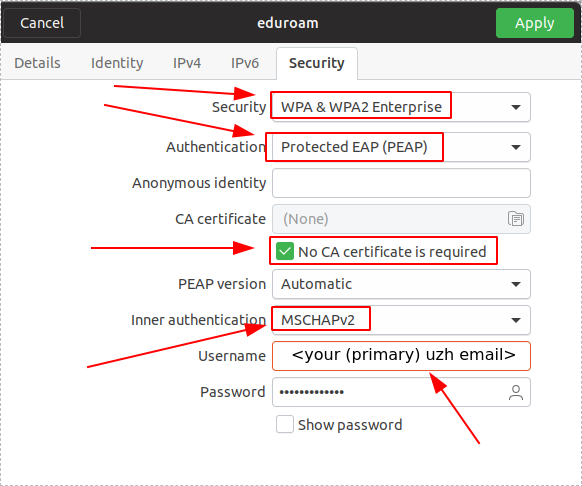
Notes: - since 5.06.2024 the username is your primary UZH email address. For most of I-MATH member this is <firstname>.<lastname>@math.uzh.ch. - If a domain is required, use uzh.ch