
|
Size: 4727
Comment:
|
Size: 4414
Comment:
|
| Deletions are marked like this. | Additions are marked like this. |
| Line 7: | Line 7: |
| || [[#Teamviewer.com|teamviewer.com]] || all OS || x || x || x || x || ? || || [[#Google_Chrome|Google Chrome]] || all OS || x || - || - || - || ? || |
|| [[#iPad|iPad]] ||iOS || x || - || - || - || - || |
| Line 75: | Line 73: |
| = Teamviewer.com = * Install Teamviewer client. Start: * Start Teamviewer * Exchange ID's (show during start) = Google Chrome = * Check: https://remotedesktop.google.com/ * Login with gmail account. |
|
| Line 130: | Line 115: |
| = Android Tablet = |
Screen Share: Remote Shadow & Control
Service |
Use |
shadow |
control |
scale |
clipboard |
multiple user |
only thinlinc |
x |
x |
x |
x |
x |
|
all OS |
x |
- |
- |
- |
x |
|
all OS |
x |
- |
- |
- |
x |
|
iOS |
x |
- |
- |
- |
- |
Contents
VNC: Remmina / Vino
Installed on thinlinc and available for all major linux distros.
Thinlinc:
[host] share screen: Applications > Remote Desktop > Desktop Sharing
- [on] Allow other users to view your Desktop.
- [on] Allow other users to control your Desktop.
[guest] join screen share: Applications > Remote Desktop > Remmina
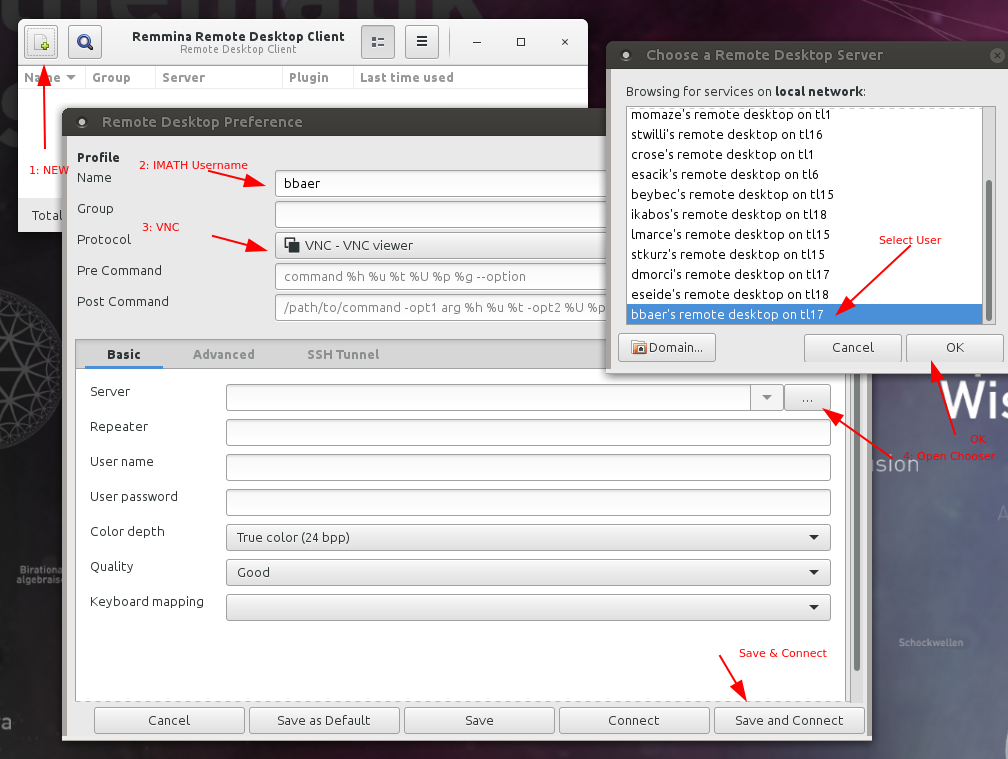
- The [host] has to accept the join request.
- After saving the user - for future sessions just doubleclick the username.
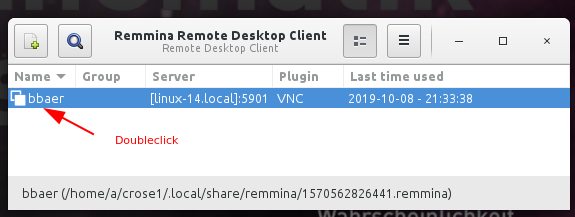
FAQ
- Q: I am the host, I want to disconnect all guests!
A: [host] Click on the 'Desktop Sharing' icon in the top panel and choose Disconnect <user>.
- Q: Fast way to join on a screen share?
A: [guest] Check the Remmina symbol in the top panel. Click on it and you'll see all your saved buddies.
- Q: The name of my colleague does not appear in the chooser list!
A: [host] Let the colleague open a terminal and type: vino.sh - this will restart the 'Desktop Sharing'.
Q: Double click on the colleague's name opens the window and shows Can't connect!
A: [guest] Stop Remmina and start again. Explanation: if the colleague logs off from thinlinc and logs in again, a new server might be assigned. With restarting Remmina, the buddies list is updated with the latest server/buddy pairs.
- Q: Sharing is fine, but the window is too big - it should be scaled!
- A: [guest] On the left side switch on 'Toggle Scale Mode'
- Q: The [host] says there is no 'screen share request' to acknowledge!
- A: [host] Sometimes the window with the screen share request is in the background - look at the bottom task list for a window with 'bold' text, click on it and it comes to the front.
hello.math.uzh.ch / RocketChat
Install https://rocket.chat/install App
- Server: hello.math.uzh.ch
- Account: I-MATH username/password
- Only shadow, no remote control.
Start:
Start a voice call via RocketChat.
- Click on 'screen share'
Skype
- Install Skype client.
- Create / use your Microsoft Account
- Only shadow, no remote control.
Start:
- Start a voice call via Skype.
- Click on 'screen share'
iPad
Quick Time
AirServer
(commercial) https://www.airserver.com/WindowsDesktop
iPad > Linux
[user@ubuntu20.04]
$ sudo apt-get install cmake libavahi-compat-libdnssd-dev libplist-dev libssl-dev libgstreamer1.0-dev libgstreamer-plugins-base1.0-dev gstreamer1.0-libav gstreamer1.0-vaapi gstreamer1.0-plugins-bad

$ git clone https://github.com/FD-/RPiPlay.git
$ cd RPiPlay
$ mkdir build; cd build; cmake ..
$ make
$ sudo make install

# On problems it might help to install:
$ sudo apt install ubuntu-restricted-extras vlc

# Start
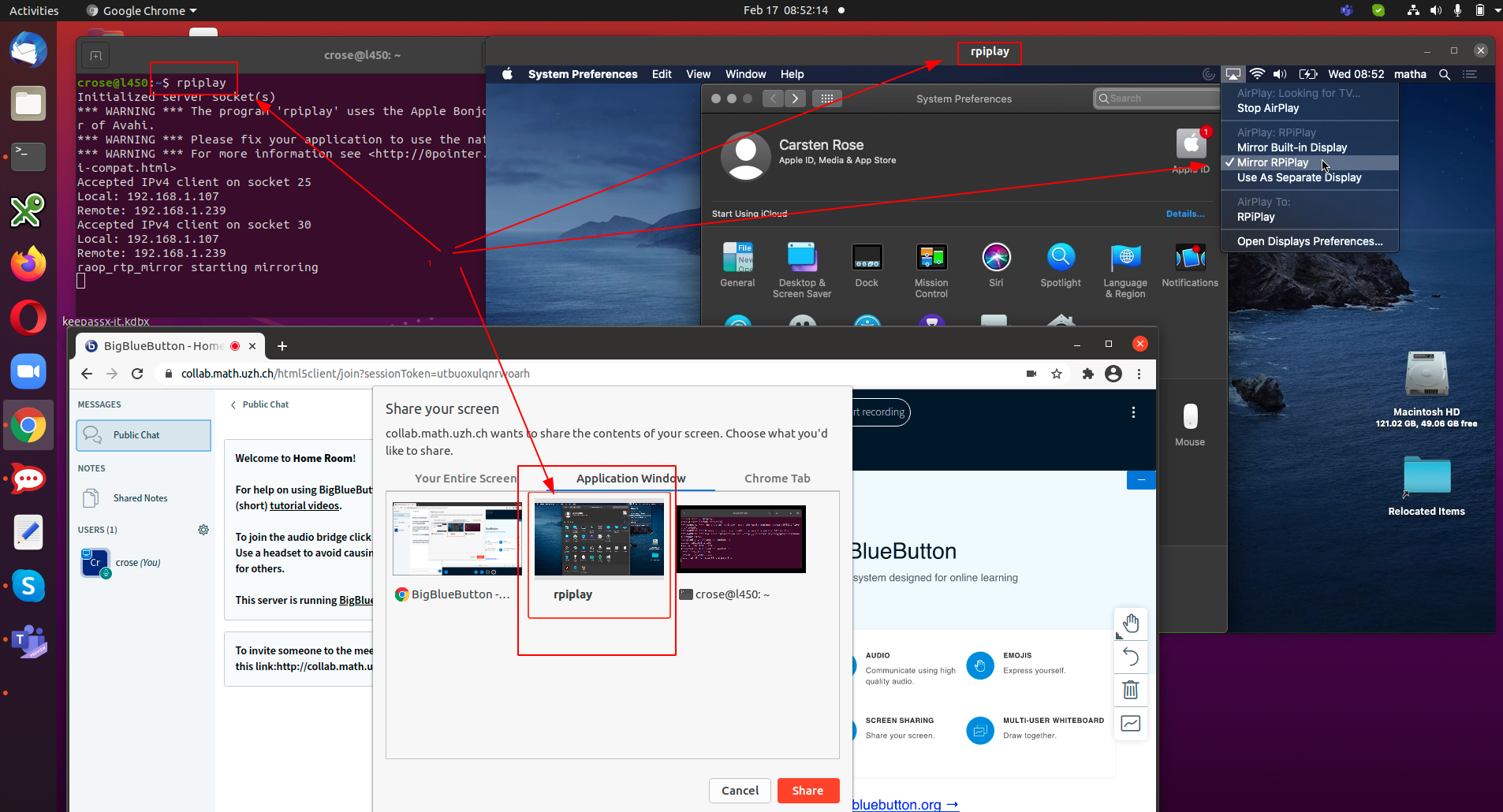
$ rpiplay
On the iPad, share the screen: https://support.apple.com/en-us/HT204289.
Select rpiplay as destination (is only shown as long as on the Linux host the program rpiplay is running)
- On the linux host a window pops up.
A compiled version of rpiplay for Linux Ubuntu 20.04 is available under https://drive.math.uzh.ch/index.php/s/ek3oFfHb4Z9zaYt
Android Tablet
Problem
Mac OS X Catalina / 10.15
Each applications needs the screen record privilege: https://help.daily.co/en/articles/3400532-enable-screen-recording-permission-for-macos-catalina-10-15-and-later