
|
Size: 210
Comment:
|
Size: 575
Comment:
|
| Deletions are marked like this. | Additions are marked like this. |
| Line 3: | Line 3: |
| = Adjust scanned books, papers = * use 'scan tailor' - installed on Sun Ray and ThinLinc. * http://www.heise.de/open/artikel/Toolbox-Scan-Tailor-bringt-gescannte-Dokumente-in-Form-1787142.html |
* H52: [[scanner_h52|Scanner]] at the Windows computer. * Copy machines on Floor 'J' and 'K' (you need a copy machine code - not for students). = Remove background = To remove the background color 'white' (or similar to white): In Thinlinc, please save the image, open the file manager, and choose 'Remove background'. {{attachment:removebackground.png}} This is especially useful for scanned signatures to paste to a document. = PDF / TIFF = {{{ # PDF > TIFF convert source.pdf new.tiff # TIFF > PDF convert source.tiff new.pdf }}} |
Scan
H52: Scanner at the Windows computer.
- Copy machines on Floor 'J' and 'K' (you need a copy machine code - not for students).
Remove background
To remove the background color 'white' (or similar to white): In Thinlinc, please save the image, open the file manager, and choose 'Remove background'.
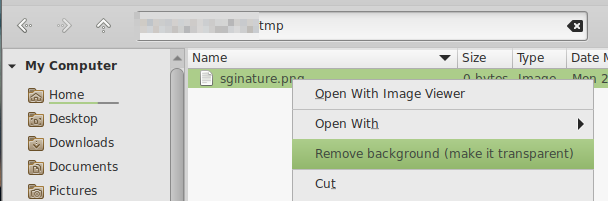
This is especially useful for scanned signatures to paste to a document.
PDF / TIFF
# PDF > TIFF
convert source.pdf new.tiff

# TIFF > PDF
convert source.tiff new.pdf