Rocket Chat
You can find the Rocket Chat application under Applications > Internet > Rocket.Chat
Channels
Clicking on the Globe Symbol (Directory) displays the list of all public channels. By clicking on one of those groups, you will see the active conversation and can join it by clicking on the JOIN button at the end.
Channel
Inside a channel, you can click on the three dots at the top right corner, which opens a list of various options.
- File List
- See all the files that are uploaded to the channels
- Mentions
- See everyone that tagged you in their own message by writing @yourUsername
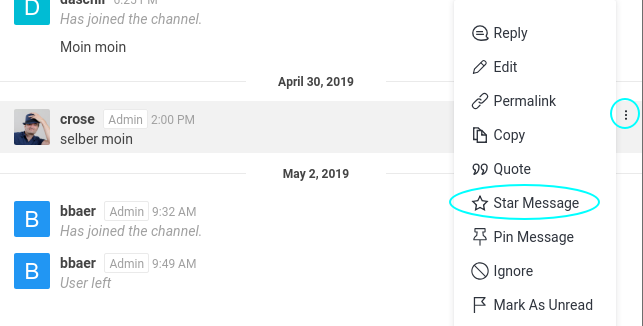
Starred Messages
* If you want to remember a message for later, you can star it by clicking on the 3 dots at the right side of the message and choosing Star Message