
|
Size: 176
Comment:
|
← Revision 43 as of 2026-03-23 13:50:57 ⇥
Size: 1298
Comment:
|
| Deletions are marked like this. | Additions are marked like this. |
| Line 1: | Line 1: |
| = How to install the Institute Printers on osX 10.6 = | <<TableOfContents>> |
| Line 3: | Line 3: |
| * connect your MacBook to the Institute Networkt * start up a webbrowser and connect to http://localhost:631 * |
= Printing via UPP = * Recommended for students. * Printing is possible via LAN or WLAN as long as it is UZH internal. * [[https://www.zi.uzh.ch/de/support/it-workplace/uzhprintplus/install-printer.html#macOS|UZH Print Plus]] = Printing via MATH-Print dedicated MAC Printserver = ||<tablewidth="100%"#228b22 style="text-align:center"> {X} To use the printer in Y27, you need a '''LAN connection''' (not WLAN) || * Recommended for institute members. * The following printers can be added: k11, j11, k49color, g25 (all public rooms). * In the "Add Printer" dialogue, select the "Bonjour Shared" ones that contain "@ print-mac" in the name. {{attachment:11.png}} {{attachment:12.png}} = Printing via MATH-Print Linux Printserver = ||<tablewidth="100%"#228b22 style="text-align:center"> {X} To use the printer in Y27, you need a '''LAN connection''' (not WLAN) || * Open System Settings > Printers & Scanners > Add Printer * Example: Printer K, if you want a different printer replace the k after "printers/" with your printer name (k30, g25, jcolor,...) {{attachment:097AD18D-87D2-4B3C-8FAF-131B2CB11549.jpeg}} == Special cases == * k49color: use print22.math.uzh.ch:631 as the address, otherwise files are not printed |
Contents
Printing via UPP
- Recommended for students.
- Printing is possible via LAN or WLAN as long as it is UZH internal.
Printing via MATH-Print dedicated MAC Printserver
|
 To use the printer in Y27, you need a LAN connection (not WLAN)
 - Recommended for institute members.
- The following printers can be added: k11, j11, k49color, g25 (all public rooms).
- In the "Add Printer" dialogue, select the "Bonjour Shared" ones that contain "@ print-mac" in the name.

Printing via MATH-Print Linux Printserver
|
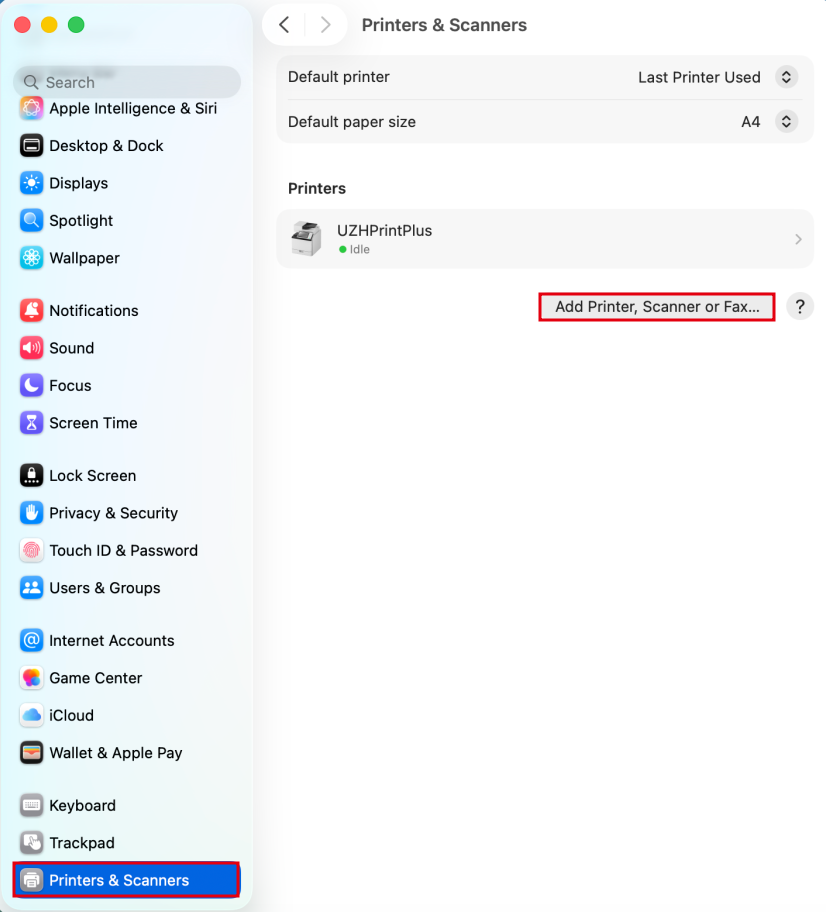
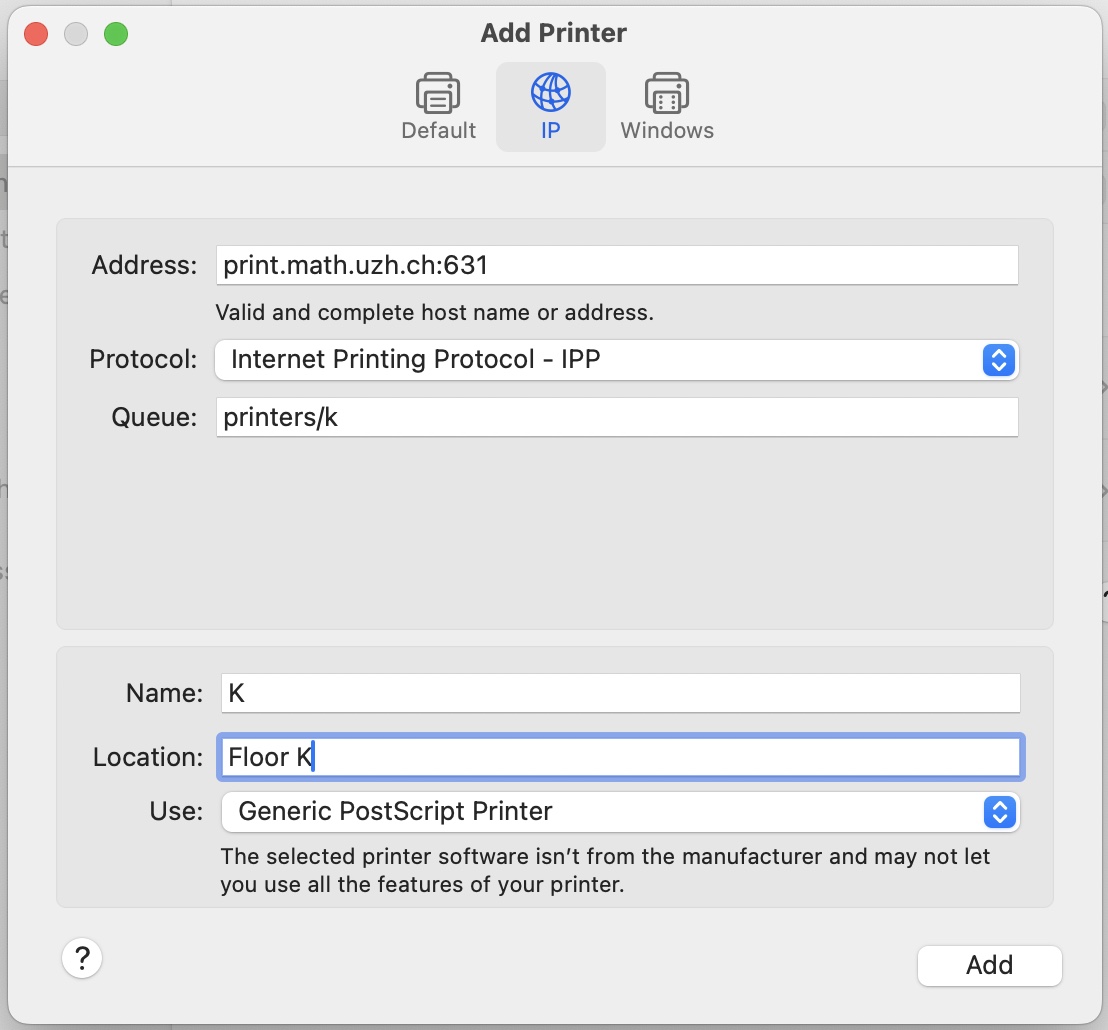
Open System Settings > Printers & Scanners > Add Printer
- Example: Printer K, if you want a different printer replace the k after "printers/" with your printer name (k30, g25, jcolor,...)
Special cases
- k49color: use print22.math.uzh.ch:631 as the address, otherwise files are not printed