# Office365
# Download
- Open Office 365: [https://www.office.com/](https://www.office.com/).
- Sign in with the UZH Microsoft Account (in the center or on the top right). 
- Nowadays (2026), Copilot opens up first, click on the 3by3 dot matrix icon in the top left, then *More apps*. [](https://wiki.math.uzh.ch/public/uploads/images/gallery/2026-07/E5Kimage.png)
- Then click on *install apps,* then *Microsoft 365 apps* and proceed from there.
[](https://wiki.math.uzh.ch/public/uploads/images/gallery/2026-07/AjGimage.png)
# Excel
### Issues
#### Numbers are unwillingly converted to dates
- Excel is configured to recognize dates and change the formatting of a cell automatically, whenever it recognizes a date.
- Sometimes the recognition is faulty, which results in cells being formatted as dates, even though it is just a number.
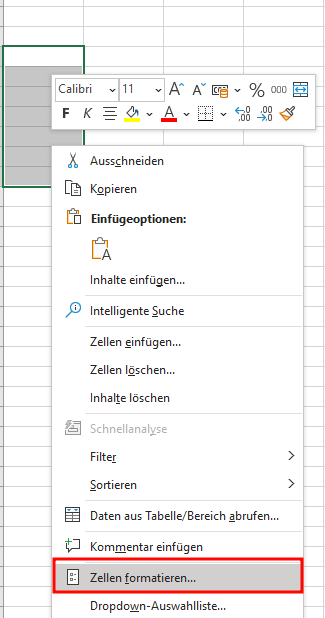
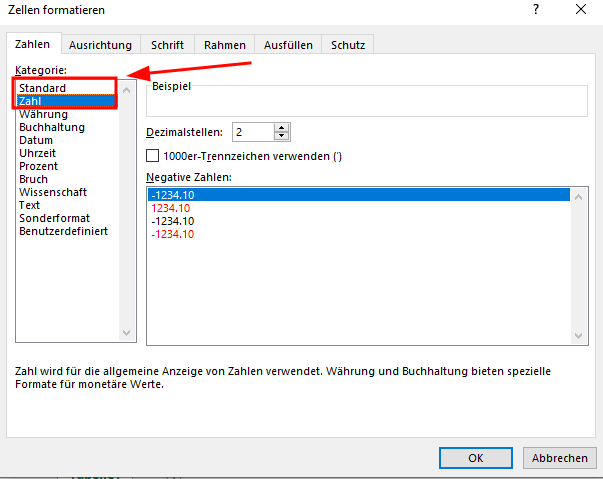
- There are two approaches to fix the issue:
1. Format all the cells before inserting numbers (select either "standard" or "number"):
[](https://wiki.math.uzh.ch/public/uploads/images/gallery/2026-07/gJbimage.png)
[](https://wiki.math.uzh.ch/public/uploads/images/gallery/2026-07/lGbimage.png)
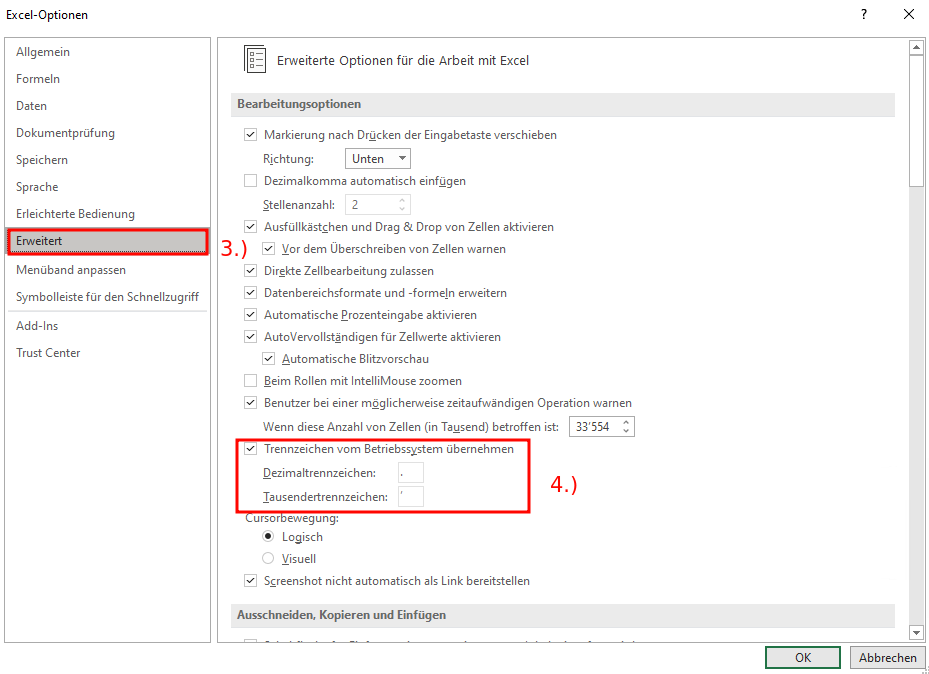
1. Change decimal & thousands separator (regional settings):
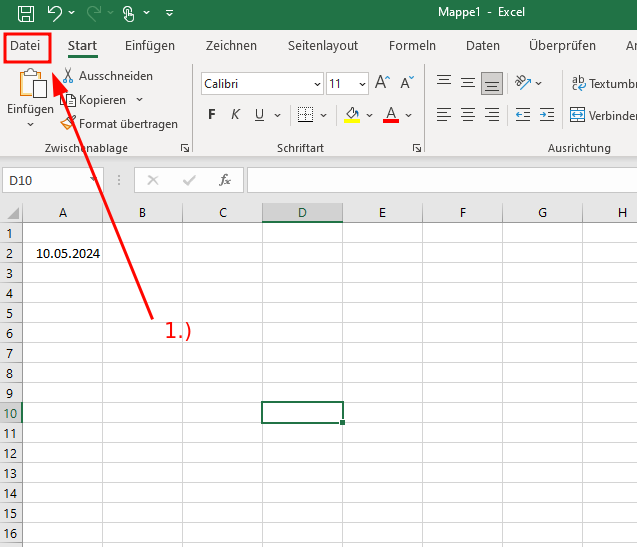
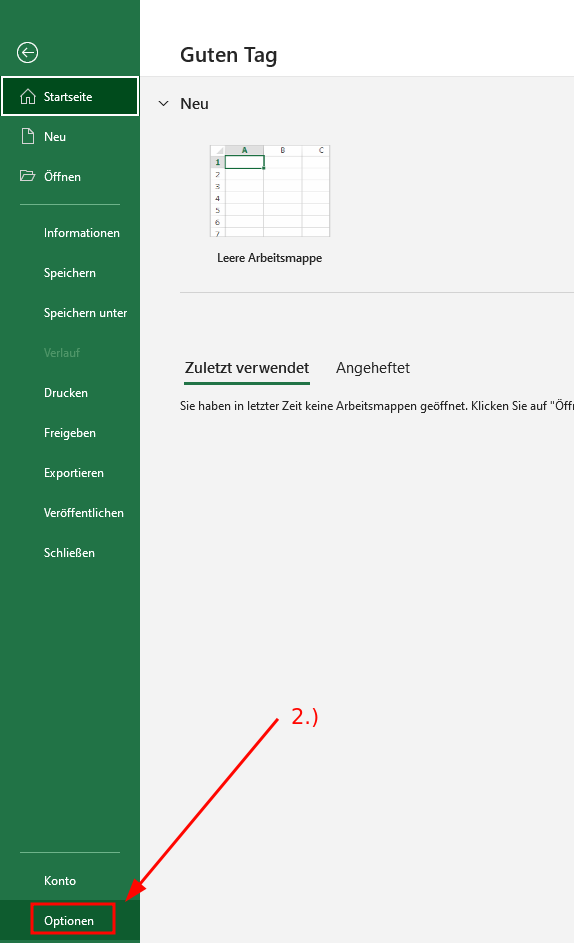
- Click File > Options
- On the Advanced tab, under Editing options, clear the "Use system separators" check box
- Type new separators in the "Decimal separator" and "Thousands separator boxes"
[](https://wiki.math.uzh.ch/public/uploads/images/gallery/2026-07/fn2image.png)
[](https://wiki.math.uzh.ch/public/uploads/images/gallery/2026-07/hIqimage.png)
[](https://wiki.math.uzh.ch/public/uploads/images/gallery/2026-07/sQCimage.png)
# OneDrive
- No good solution for UZH users.
- In general, there are different variants to access !OneDrive from Linux.
- Unfortunately: UZH policy blocks apps (used with UZH Microsoft account), which are not not privileged (security reasons) - the only allowed app is Microsoft !OneDrive App (only for Windows/Mac).
- It is possible to install a Web-App, which behaves a little bit like a lokal app, but the files are still remote.
### OneDrive WebApp
- Open [https://uzh-my.sharepoint.com/](https://uzh-my.sharepoint.com/) and log in - best in Chrome or Brave.
- Click on the install icon (upper right corner)
[](https://wiki.math.uzh.ch/public/uploads/images/gallery/2026-06/onedrive-install.png)
- From now on, you can start !OneDrive via the Menu > Type: !Onedrive > click
[](https://wiki.math.uzh.ch/public/uploads/images/gallery/2026-06/onedrive-start.png)
- But this is only a webinterface, not local storage, see [drive.math.uzh.ch](https://wiki.math.uzh.ch/public/books/public-wiki/page/drivemathuzhch "drive.math.uzh.ch") for a file sharing solution including local storage.
# Outlook
- URL: [https://outlook.com](https://outlook.com)
- To login, use your UZH identity (email address, MFA setup [https://wiki.math.uzh.ch/public/books/public-wiki/page/microsoft-authentication](https://wiki.math.uzh.ch/public/books/public-wiki/page/microsoft-authentication))
- FAQ: [https://www.zi.uzh.ch/de/support/Outlook-und-Kollaboration-Office-365/outlook/faq.html](https://www.zi.uzh.ch/de/support/Outlook-und-Kollaboration-Office-365/outlook/faq.html)
### Out of Office
- [https://support.microsoft.com/en-us/office/set-up-auto-reply-out-of-office-cc0e480f-973e-4412-a27b-8a52108d6d51](https://support.microsoft.com/en-us/office/set-up-auto-reply-out-of-office-cc0e480f-973e-4412-a27b-8a52108d6d51)
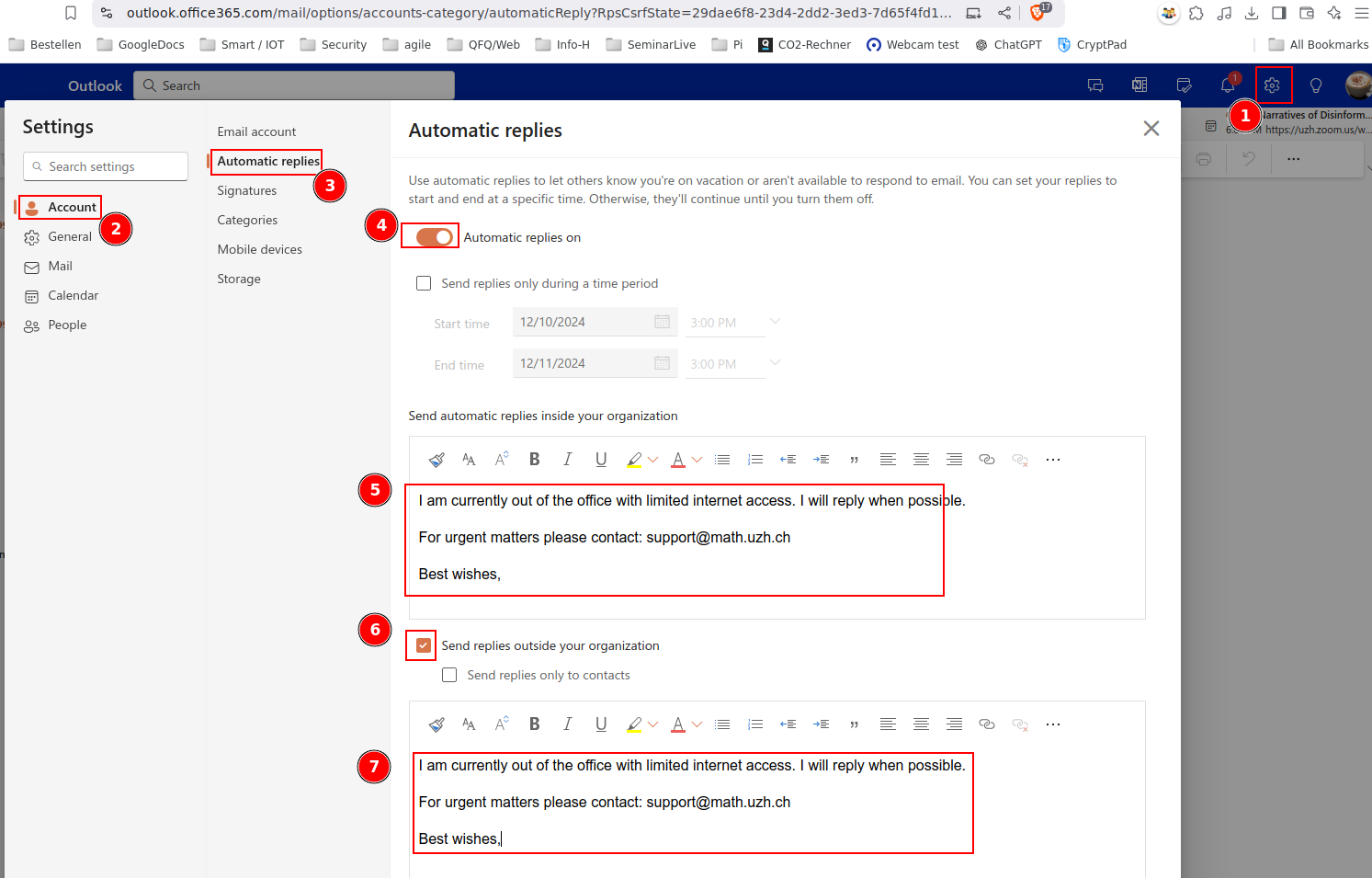
- Take care that you put your OoO message **two** times in the 'automatic reply'-Settings:
- Send automatic replies inside your organization
- Send replies outside of your organization
[](https://wiki.math.uzh.ch/public/uploads/images/gallery/2026-06/ooo.png)
### Shared Mailbox
#### Webinterface
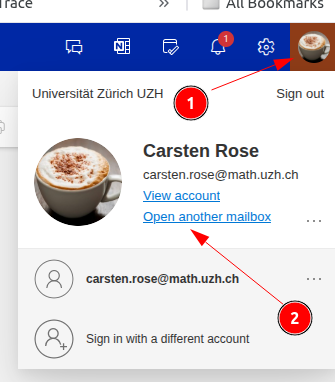
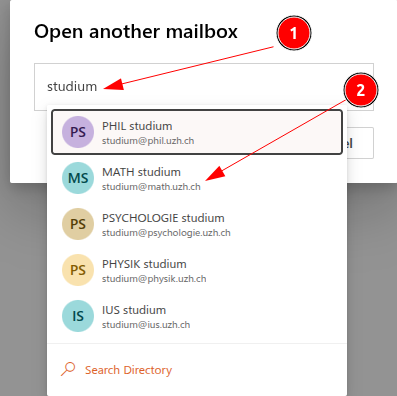
##### Open another mailbox
[](https://wiki.math.uzh.ch/public/uploads/images/gallery/2026-06/outlook-su01.png)
[](https://wiki.math.uzh.ch/public/uploads/images/gallery/2026-06/outlook-su02.png)
##### Shared Accounts im Outlook Webinterface anzeigen
[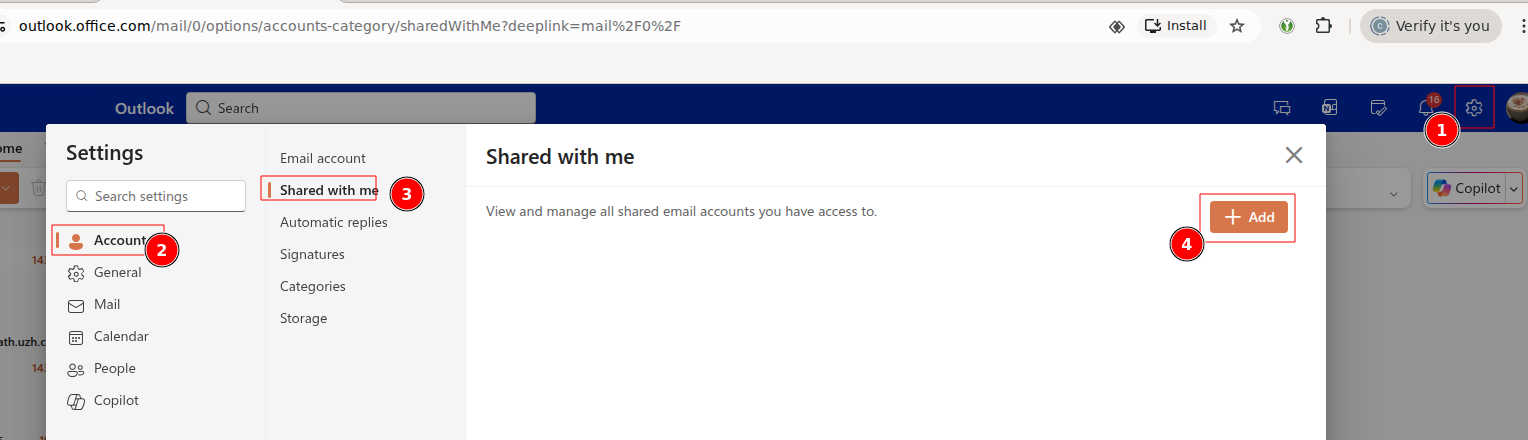](https://wiki.math.uzh.ch/public/uploads/images/gallery/2026-06/outlook-admin-accounts.png)
#### Outlook App (e.g. Citrix)
##### Shared Mailbox anzeigen
- [Microsoft Help](https://support.microsoft.com/en-us/office/open-and-use-a-shared-mailbox-in-outlook-d94a8e9e-21f1-4240-808b-de9c9c088afd#picktab=classic_outlook)
- By default, all shared mailboxen should be shown automatically!
- If some is missing, add them manually:
[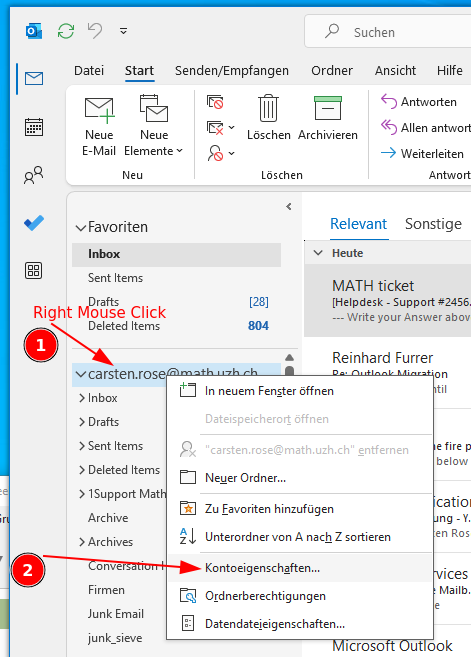](https://wiki.math.uzh.ch/public/uploads/images/gallery/2026-08/ZFcimage.png)
[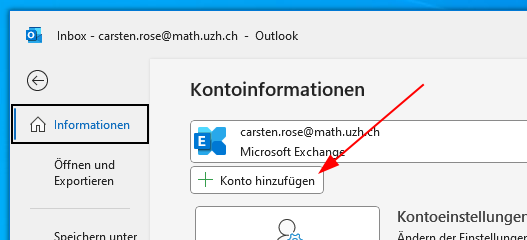](https://wiki.math.uzh.ch/public/uploads/images/gallery/2026-08/O5Dimage.png)
[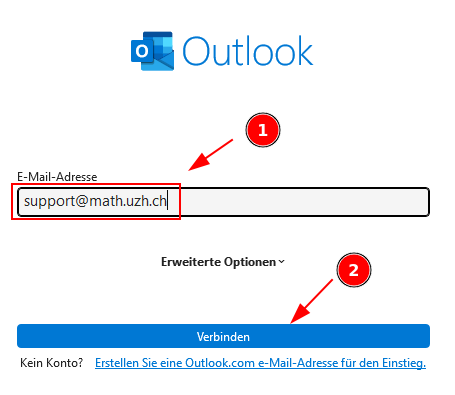](https://wiki.math.uzh.ch/public/uploads/images/gallery/2026-08/ZhSimage.png)
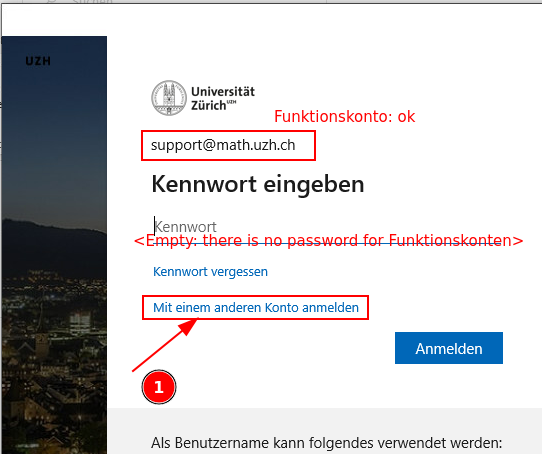
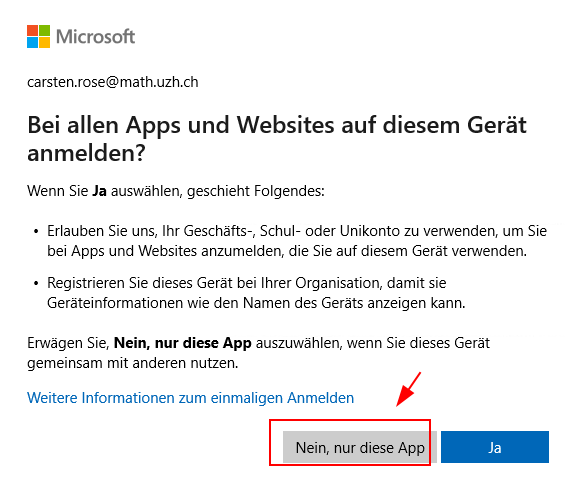
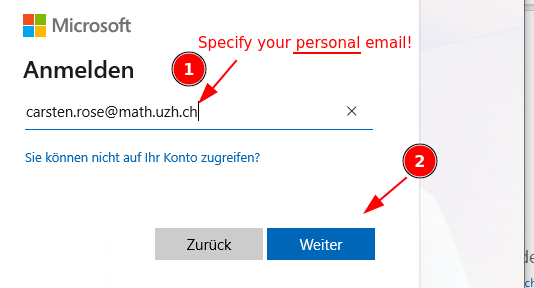
Attention: there is no password for shared mailboxes (=Funktionskonten). Click on 'Mit einem anderen Konto anmelden' and specify your personal email.
[](https://wiki.math.uzh.ch/public/uploads/images/gallery/2026-08/5fEimage.png)
[](https://wiki.math.uzh.ch/public/uploads/images/gallery/2026-08/BTgimage.png)
[](https://wiki.math.uzh.ch/public/uploads/images/gallery/2026-08/FuEimage.png)
##### New Mail: 'From' automatically selected by current selected mailbox
If there are multiple email adresses configured and a new email is created: it would be nice if 'from' points automatically to the last selected email account.
According to Microsoft, this is not supported by Outlook ([Link](https://support.microsoft.com/en-us/office/change-the-account-used-to-send-email-messages-2bdd8d4f-e30f-4ec8-88a0-406ce7b23cc5)).
##### Why is the 'From' button missing?
See: [Link](https://support.microsoft.com/en-us/office/change-the-account-used-to-send-email-messages-2bdd8d4f-e30f-4ec8-88a0-406ce7b23cc5)
##### Saving mail in drafts folder of the current email account
- Short: only with extra effort.
- Long: [https://learn.microsoft.com/en-us/answers/questions/5490248/drafts-are-saving-to-my-drafts-folder-instead-of-m](https://learn.microsoft.com/en-us/answers/questions/5490248/drafts-are-saving-to-my-drafts-folder-instead-of-m)
### Email forward
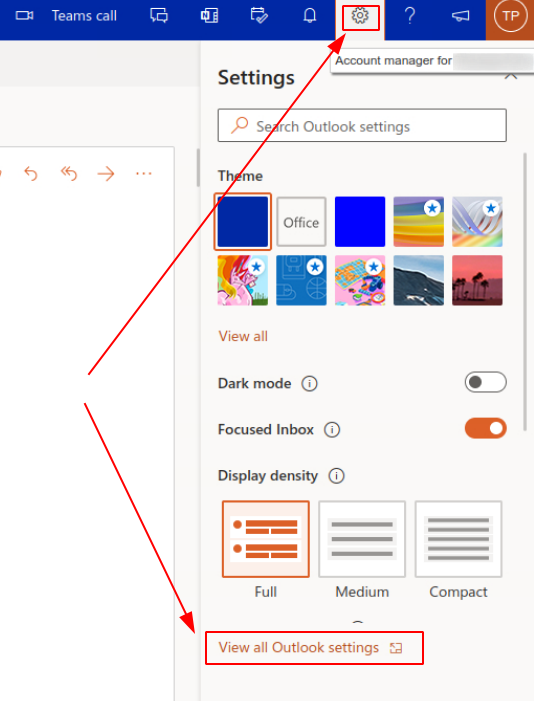
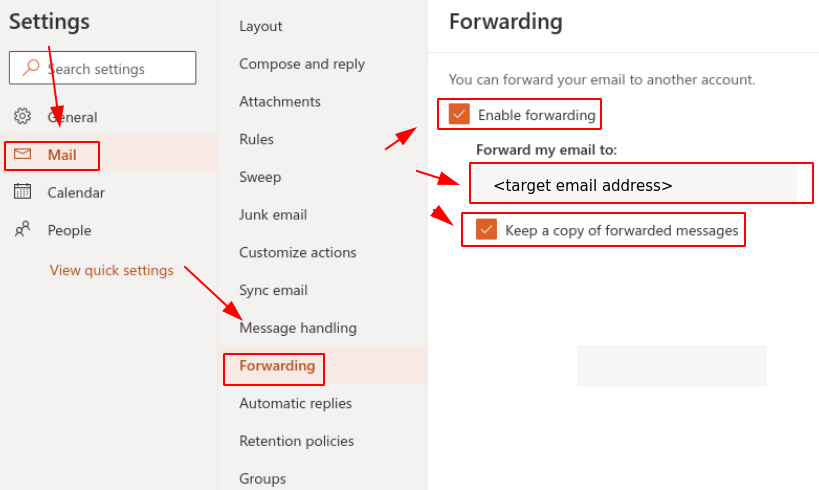
Setting up an email forward in Office 365 (Outlook) via Webinterface.
- Log in to [https://outlook.office365.com](https://outlook.office365.com)
- Go to `Settings > View all Outlook settings`
[](https://wiki.math.uzh.ch/public/uploads/images/gallery/2026-06/m365forward-01.png)
- Go to `Mail > Forwarding`
[](https://wiki.math.uzh.ch/public/uploads/images/gallery/2026-08/wfvimage.png)
##### Disable
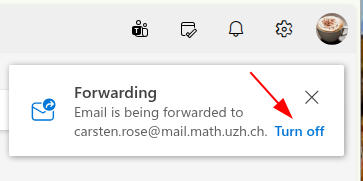
- When you log in on the webinterface, just click on *Turn Off*:
[](https://wiki.math.uzh.ch/public/uploads/images/gallery/2026-08/Kjpimage.png)
## Hints
### Outlook for Mac - Realname
- Beim anlegen des IMAP Kontos: bei der Anmeldung „Synchronisation mit Microsoft Konto“ ausschalten. Danach kann beim Konto der Realname geändert werden.
### Apple Mail and 'Shared Mailbox'
- Not supported.
- If you try to configure, you'll receive 'There is already an account'
- [https://learn.microsoft.com/en-us/answers/questions/5791910/microsoft-shared-mailbox-in-apple-mail](https://learn.microsoft.com/en-us/answers/questions/5791910/microsoft-shared-mailbox-in-apple-mail)
- Recommendation: Use Outlook for Mac.
### 'Reply All' should not include myself
- Currently we don't know if this is an option.
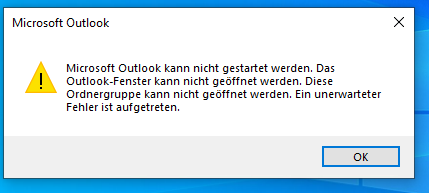
### Message: Outlook could not be started
[](https://wiki.math.uzh.ch/public/uploads/images/gallery/2026-09/image.png)
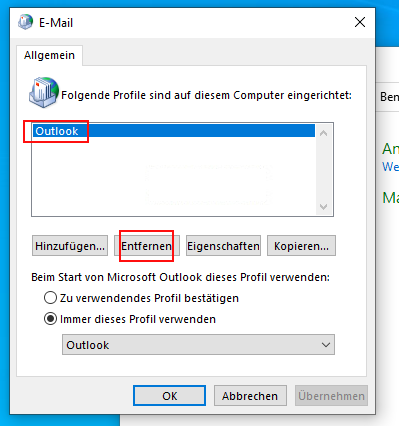
**Fix:** Systemsteuerung > Benutzerkonten > Mail (Microsoft Outlook) > Profile: Profile Anzeigen > Entfernen
[](https://wiki.math.uzh.ch/public/uploads/images/gallery/2026-09/Bm0image.png)
## Observations - needs to be investigated
- Send a mail via Thunderbird (Sender is personal account) to an outlook shared mailbox (configured as a mailling list via rules). Sender is member of the mailing list.
- Mail is **not** received by the sender - not clear if the other member received the mail.
- Send a mail via **Thunderbird** (Sender is personal account) to a not existing outlook address [...@uzh.ch](mailto:...@uzh.ch)
- **No error Message**. Even not a Mailer Daemon error.
- Sending via Outlook Web generates a Mailer Daemon error.
- Send a mail from a shared mailbox, one of the receivers deliver an automatic response.
- The response is received on the personal account, not on the shared mail box