LaTeX
epstopdf
(Automatically) converting EPS-Files to PDF-Files with epstopdf
If you need to convert an .eps-File to a .pdf-File, we highly recommend the usage of epstopdf. The conversions are of really high quality and look almost as good as the original graphics.
Converting by hand
To convert a given file called "foo.eps", simply type
epstopdf foo.eps
into your shell.
Converting files automatically by using the epstopdf-package
It is also possible to convert your .eps-Files automatically while compiling your .tex-Files. To achieve this, you need to
- include the graphix-package into your TeX-document with the pdftex-option and include the epstopdf-package after the graphicx-package, so your document header should look like this:
\usepackage[pdftex]{graphicx}
\usepackage{epstopdf}
- allow pdfTeX to execute external programs while compiling your document by setting the "--shell-escape" (TeXlive, on Ubuntu/Solaris) or "--enable-write18" (MikTeX, on Windows) command line option. So, if you compile your document (called foo.tex in the example) on a shell directly, you would enter the following commands into your shell.
Using TeXlive:
pdflatex --shell-escape foo.tex
Using MikTeX:
pdflatex -enable-write18 foo.tex
Modifing editor settings
Instead of compiling your TeX-document directly on a shell, you could amend the configuration of your favorite TeX-editor, e.g. Kile or WinShell.
In Kile, open up the configuration window via "Settings -> Configure Kile...", expand "Tools" on the left and click on "Build" just below "Tools". Then, select "PDFLaTeX" in the "Select a tool"-list and add "-shell-escape" to the "Options"-textfield on the right so that this textfield now should contain text similar to the following:
-interaction=nonstopmode -shell-escape '%source'
Click on "Ok" to save this modification.
In WinShell, open the "Program Calls"-tab in the "Options"-window by clicking "Options -> Program Calls...", select "PDFLaTeX" from the "Program"-list on the right and add "-enable-write18" into the "cmd-Line"-textfield so that this textfield should contain text like this:
-interaction=nonstopmode -enable-write18 -synctex=-1 "%s.tex"
Click on "OK" to save you new options.
In other TeX-Editors, there should be similar possibilities to modify the way your TeX-tools are executed.
It is possible now to convert .eps-images automatically to .pdf-files while typing your documents in your favorite editor.
Official Package Documentation
For more information, please have a look at the official package documentation of the epstopdf-package at https://ctan.org/pkg/epstopdf?lang=de
Overview-Latex
TeX/LaTeX Documentation
- A short introduction to LaTeX: https://tobi.oetiker.ch/lshort/lshort.pdf
- Based on the original German edition found here: http://www.ctan.org/tex-archive/info/lshort/german
UZH Style Templates
The UZH offers LaTeX templates with official corporate design. Below you can find versions of these templates adapted for the Institute of Mathematics.
Letter
The UZH Letter style is based on the KOMA Letter package. Documentation: http://www.ctan.org/pkg/scrlttr2
Please make sure that the return address (Institute of Mathematics) is mentioned on the envelope!
Direct downloads of the letter templates:
- UZH Brief deutsch mit Absender (pdf) (ps) (tex)
- UZH Brief deutsch ohne Absender (pdf) (ps) (tex)
- UZH Letter English with Sender (pdf) (ps) (tex)
- UZH Letter English without Sender (pdf) (ps) (tex)
Please replace the text enclosed by angle brackets (<>) with the appropriate information.
Presentation
Direct downloads of the persentation templates:
- UZH Präsentation deutsch (informell) (pdf) (ps) (tex)
- UZH Präsentation deutsch (pdf) (ps) (tex)
- UZH Presentation English (informal) (pdf) (ps) (tex)
- UZH Presentation English (pdf) (ps) (tex)
Working with Templates on the I-MATH Terminals
If you are working with the I-MATH Terminals, you can also find the official LaTeX templates linked above at /scratch/templates/latex. Copy the desired template to your home directory, or any other suitable location (Do not edit the files in /scratch/templates/latex) and edit it with your favorite LaTeX editor.
Installation of Corporate Design Templates
You have to perform the steps below only when using the LaTeX on your Notebook or Personal Computer.
Windows
This instruction assumes that the latest MikTeX is installed including KOMA-Script, lastpage, mptopdf, and arial package. In order to ensure you're running the latest version or installing missing packages, start the MikTeX Console and select "Updates" from the dropdown menu. Press "check for updates" and install the available ones.
Letter Templates
Download the LaTeX Letter templates from math www (access). Unzip the package, and copy the entire nmathletter directory to C:\\AppData\Local\Programs\MiKTeX\tex\latex\.
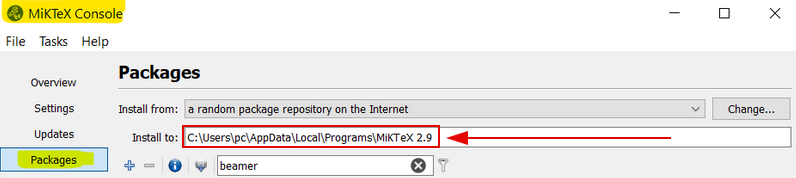
Find install Path: Open MiKTeX Console --> Packages --> "Install in:" --> use this path for your packages
Beamer Templates
Download the LaTeX Beamer templates from math www (access). Unzip the package, and copy the entire mathbeamer directory to C:\\AppData\Local\Programs\MiKTeX\tex\latex\.
Ubuntu
You need to have the Ubuntu package texlive-fonts-extra installed:
In order to install the Arial font, type on a command line: sudo getnonfreefonts --sys arial-urw
If there is no getnonfreefonts :
cd /var/tmp
curl -O http://tug.org/fonts/getnonfreefonts/install-getnonfreefonts
texlua install-getnonfreefonts
getnonfreefonts --sys arial-urw
Letter Templates
- Download the LaTeX Letter templates from math www (access).
- Unzip the package, and copy the entire
nmathletterdirectory/usr/local/share/texmf/tex/latex. - Download https://ctan.org/pkg/koma-script and save it to
/usr/local/share/texmf/and unzip the file in that directory. - Run
sudo mktexlsrin order to update the search database of latex.
Beamer Templates
- Download the LaTeX Beamer templates from math www (access).
- Unzip the package, and copy the entire
mathbeamerdirectory to/usr/local/share/texmf/tex/latex. - Run
sudo mktexlsrin order to update the search database of latex.
MacOS X
installation of required packages and prepare installation
- Download and install the latest MacTeX. MacTeX can be obtained here.
- next, you need to install the required fonts.
- before this can be performed, you need to set the correct installation path. Please open a terminal and type
export PATH="/Library/TeX/texbin/:$PATH" - Download the installer "install-getnonfreefonts" to i.e. the Downloads directory: getnonfreefonts can be obtained here
- assuming the terminal is still open, please navigate (cd) into the directory containing the downloaded file
- type
sudo texlua install-getnonfreefonts - do not close the terminal, as we need it for the next steps
Installing the Arial Font
- in the terminal type now:
sudo getnonfreefonts --sys arial-urw- The font Arial will be downloaded
- next, in order to install the fonts run this command in the same terminal
updmap-user
Further notes can be found:
Letter Templates
Download the LaTeX Letter templates from math www. Unzip the package, and copy the entire nmathletter directory to /usr/local/texlive/texmf-local/tex/latex/local (you need administrative privileges to perform this task and you will be asked to enter your password).
Run sudo mktexlsr in a terminal in order to update the search database of latex.
Beamer Templates
Download the LaTeX Beamer templates from math www. Unzip the package, and copy the entire mathbeamer directory to /usr/local/texlive/texmf-local/tex/latex/local (you need administrative privileges to perform this task and you will be asked to enter your password).
Run sudo mktexlsr in a terminal in order to update the search database of latex.
- note: all sudo introduced command requires a password to perform the action
UZH Logo
If you want to include the UZH logo in a LaTeX document, download this zip file. Read the README.pdf file for instructions.
Tips and tricks
Count words in a latex document
Kile: File > Statistics
kdvi
Custom paper size
\documentclass[a4paper]{amsart}
\usepackage{amssymb,latexsym}
\usepackage{graphicx, pgf, pst-all}

\usepackage[paperwidth=17truecm, paperheight=24truecm, centering, twoside, margin=1.58cm,heightrounded]{geometry}

\textwidth14truecm
\textheight20truecm
Looking for a symbol
Converting .eps-files (automatically) to .pdf-files
Include a movie in a PDF Document
Example: omega.tex omega.mpg omega.pdf
[user@host] pdflatex omega.tex
View the PDF File in Acrobat Reader. It probably won't work on the Terminals.
Example
- movie.tex
\documentclass[12pt,landscape]{article}
\usepackage{geometry}
\geometry{verbose,letterpaper}
\usepackage{movie15}
\usepackage{hyperref}
\begin{document}
Whispering-gallery mode in a quarter circle:
\begin{figure}[ht]

\includemovie[
  poster,
  text={\small(2-twist-spun.mp4)}
]{6cm}{4.8cm}{2-twist-spun.mp4}

\end{figure}
\end{document}
- To include a Youtube Flash movie, convert it to mp4:
- Video example: http://www.youtube.com/watch?v=6lIM9p6XOKo
- Convert it online: http://keepvid.com
- Download the MP4 version: http://www.youtube.com/watch?v=6lIM9p6XOKo">http://keepvid.com/?url=http%3A%2F%2Fwww.youtube.com%2Fwatch%3Fv%3D6lIM9p6XOKo
- compile:
pdflatex movie.tex
- View in acrobat reader: movie.pdf
Graphic / Drawing
xfig
- old, powerful and strange
- http://www.xfig.org/userman/latex_and_xfig.html (Dead link)
inkscape
- modern drwaing application
- http://famelis.wordpress.com/2011/04/12/latex-and-inkscape/
- http://wiki.inkscape.org/wiki/index.php/LaTeX (Dead link)
- e.g.:
Save your image, eg as “image.svg”. In addition, in Inkscape go to the
option File -> Save a Copy and chose PDF as your output format in the
same folder as the SVG. In the PDF options popup that comes right after
select the options:

  * PDF+LaTeX: Omit text in PDF and create LaTeX file
  * Export area is drawing

Save and go to your LaTeX document.

\begin{figure}
    \centering
    \def\svgwidth{\columnwidth} % sets the image width, this is optional
    \input{image.pdf_tex}
\end{figure}
Kile
Path setting
Kile users should make sure, that under Settings|Configure Kile|Tools|Build for LaTeX and PDFLaTeX the command is /usr/sepp/bin/latex resp. /usr/sepp/bin/pdflatex.
Access: restrictions
Some files are copyright protected. To access such files (links named 'math www'), you have to provide your I-MATH credentials.
Converting Latex to Word (and more)
- Overview: https://texfaq.org/FAQ-fmtconv
| way | Correct math symbols | Keep Layout | Editable |
| Open the PDF under Windows in Adobe Acrobat (not Adobe Reader) and 'Export as Word' | - | - | ✔️ |
| Open the PDF under Windows in Adobe Acrobat (not Adobe Reader) and 'Export as Image'. Take all Images, one per side in an empty Word Document. | ✔️ | ✔️ | - |
| LyX > ODT > Word | ? | ? | ? |
| pandoc > DOCX | ? | ? | ? |
| TeX4HT: http://www.tug.org/applications/tex4ht/mn.html * All possible filters: ls -l /usr/share/tex4ht * Converting a LaTeX Document to MS Word: mk4ht oolatex filename.tex |
? | - | ✔️ |