|
Size: 92
Comment:
|
Size: 766
Comment:
|
| Deletions are marked like this. | Additions are marked like this. |
| Line 2: | Line 2: |
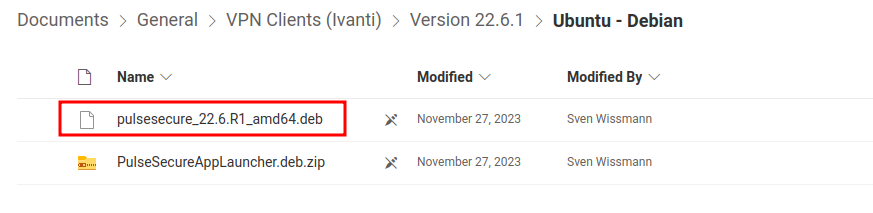
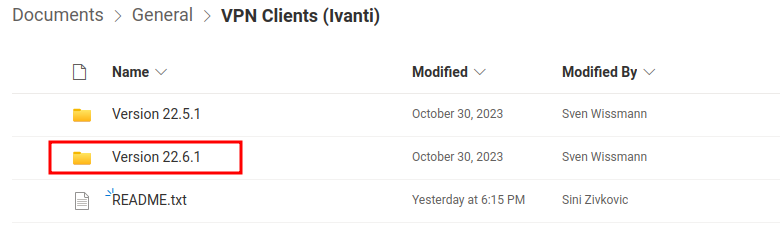
| to configure VPN, see http://www.id.uzh.ch/dl/mobil/zugaenge/vpn.html (in German) | '''Windows / MacOS / iOS / Android Setup-Guides:''' https://www.zi.uzh.ch/de/support/netzwerk/vpn_ISAC.html '''Linux Ubuntu Setup-Guide:''' 1.) Open UZH-Sharepoint VPN Access Folder: [[https://uzh.sharepoint.com/sites/UZHVPNAccess/Shared%20Documents/Forms/AllItems.aspx?csf=1&web=1&e=bnzVtF&cid=fe851a09%2Df3e2%2D4802%2Dbdb6%2D80a5b1234e33&RootFolder=%2Fsites%2FUZHVPNAccess%2FShared%20Documents%2FGeneral%2FVPN%20Clients%20%28Ivanti%29&FolderCTID=0x0120002059A8933D4FFD4E8D6F0CFC0F6C2421|UZH-Sharepoint]] 2.) Open the folder with the highest version number (newest) {{attachment:/home/b/alrutz/Documents/1.png}} 3.) Open "Ubuntu - Debian" --> Download the file ending with ".deb" {{attachment:/home/b/alrutz/Documents/3.png}} |
VPN
Windows / MacOS / iOS / Android Setup-Guides:
https://www.zi.uzh.ch/de/support/netzwerk/vpn_ISAC.html
Linux Ubuntu Setup-Guide:
1.) Open UZH-Sharepoint VPN Access Folder: UZH-Sharepoint
2.) Open the folder with the highest version number (newest)
3.) Open "Ubuntu - Debian" --> Download the file ending with ".deb"