
|
Size: 440
Comment:
|
← Revision 6 as of 2026-01-20 14:39:08 ⇥
Size: 825
Comment:
|
| Deletions are marked like this. | Additions are marked like this. |
| Line 3: | Line 3: |
| * There are different variants to access OneDrive from Linux. * Currently, the UZH policy forbids to access OneDrive, with an UZH Account, by any other than the regular Microsoft OneDrive App (only for Windows/Mac). * It is possible to install a WebApp, which behaves a little bit like a lokal app, but the files are still remote. |
* No good solution for UZH users. * In general, there are different variants to access !OneDrive from Linux. * Unfortunately: UZH policy blocks apps (used with UZH Microsoft account), which are not not privileged (security reasons) - the only allowed app is Microsoft !OneDrive App (only for Windows/Mac). * It is possible to install a Web-App, which behaves a little bit like a lokal app, but the files are still remote. |
| Line 9: | Line 10: |
| * Open https://uzh-my.sharepoint.com/ and log in. | * Open https://uzh-my.sharepoint.com/ and log in - best in Chrome or Brave. * Click on the install icon (upper right corner) {{attachment:onedrive-install.png}} * From now on, you can start !OneDrive via the Menu > Type: !Onedrive > click {{attachment:onedrive-start.png}} * But this is only a webinterface, no local storage |
OneDrive / Linux
- No good solution for UZH users.
In general, there are different variants to access OneDrive from Linux.
Unfortunately: UZH policy blocks apps (used with UZH Microsoft account), which are not not privileged (security reasons) - the only allowed app is Microsoft OneDrive App (only for Windows/Mac).
- It is possible to install a Web-App, which behaves a little bit like a lokal app, but the files are still remote.
OneDrive WebApp
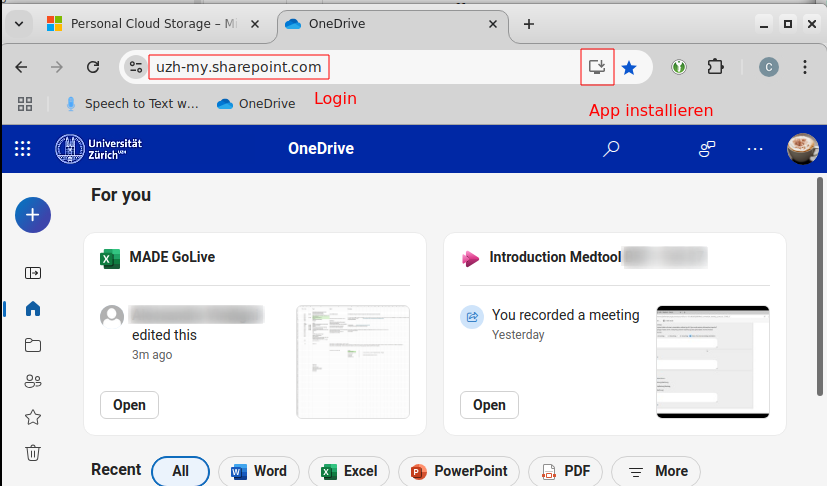
Open https://uzh-my.sharepoint.com/ and log in - best in Chrome or Brave.
- Click on the install icon (upper right corner)
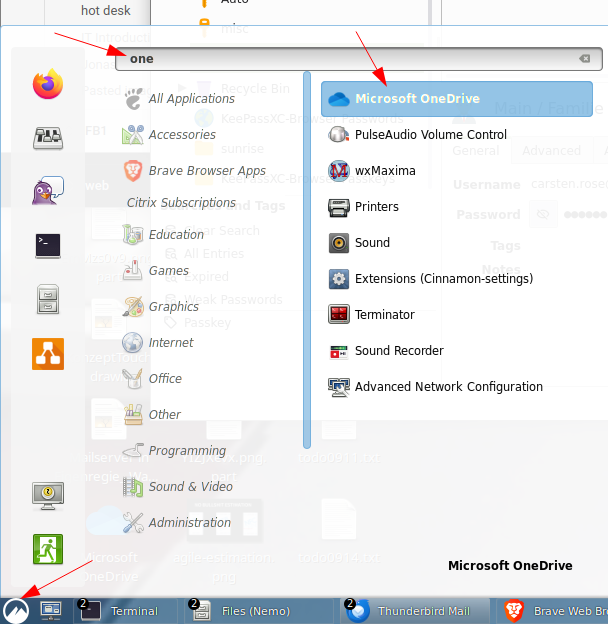
From now on, you can start OneDrive via the Menu > Type: !Onedrive > click
- But this is only a webinterface, no local storage