|
Size: 674
Comment:
|
Size: 689
Comment:
|
| Deletions are marked like this. | Additions are marked like this. |
| Line 7: | Line 7: |
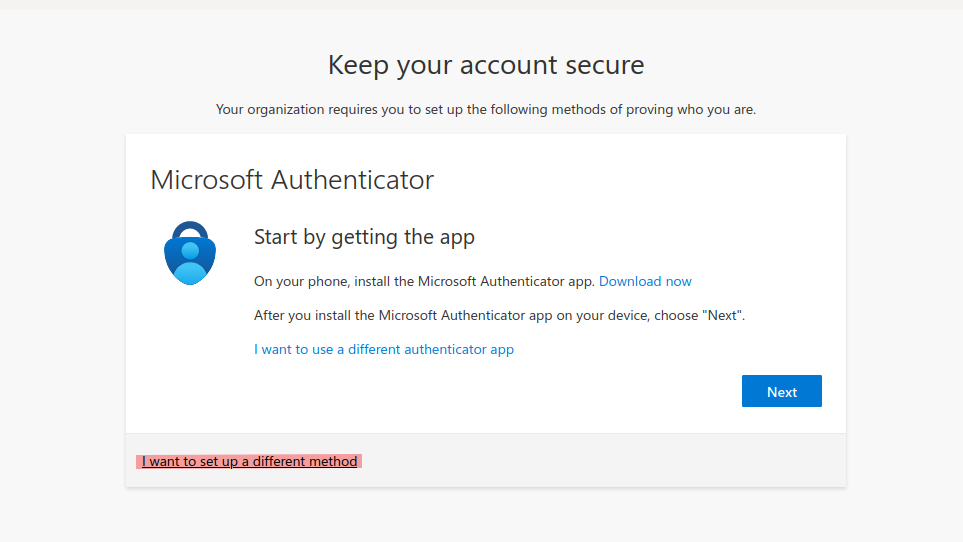
| To use a different method of Authentication, you can choose 'I want to set up a different method' when setting up your Microsoft Account. {{attachment:different_method.png}} |
* To use a different method of Authentication, you can choose 'I want to set up a different method' when setting up your Microsoft Account. {{attachment:different_method.png}} |
| Line 10: | Line 10: |
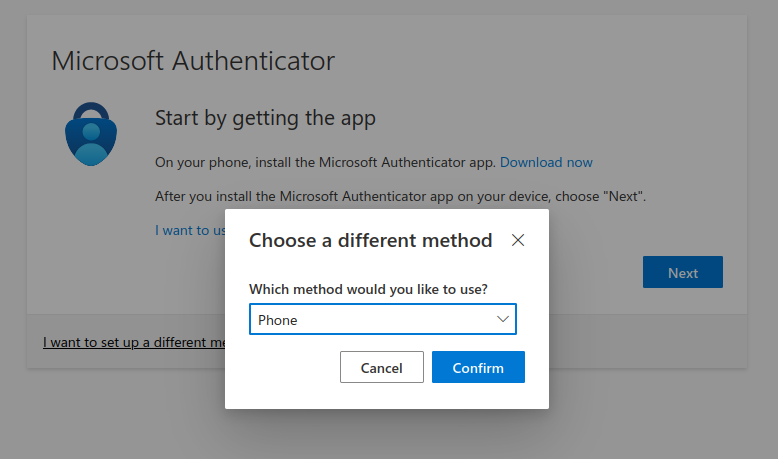
| You then get to choose a different method. We recommend you choose 'Phone', then enter the phone Number of your mobile or office phone. {{attachment:method_phone.png}} |
* You then get to choose a different method. We recommend you choose 'Phone', then enter the phone Number of your mobile or office phone. {{attachment:method_phone.png}} |
| Line 13: | Line 13: |
| You can manage the sign in options for your account here: https://mysignins.microsoft.com/security-info | * You can manage the sign in options for your account here: https://mysignins.microsoft.com/security-info |
Microsoft Authentication
Method
We recommend you don't use the Microsoft Authenticator App, because if you loose Access to your Phone, you will not be able to login to your Microsoft Account anymore.
- To use a different method of Authentication, you can choose 'I want to set up a different method' when setting up your Microsoft Account.
- You then get to choose a different method. We recommend you choose 'Phone', then enter the phone Number of your mobile or office phone.
You can manage the sign in options for your account here: https://mysignins.microsoft.com/security-info