
Exactly one page like "drive.switch.ch" found, redirecting to page.
Clear message
drive.math.uzh.ch / Nextcloud
Summary
Server |
|
|
Username |
<I-MATH Username> |
|
Password |
<I-MATH password> |
|
Native Client |
Already installed on Thinlinc |
|
Access |
worldwide |
|
Webaccess
Native Client
Thinlinc
Applications > Internet > Drive (nextCloud, ownCloud)
- You'll find a small 'cloud' icon on the upper right corner of the Thinlinc screen.

Non Thinlinc
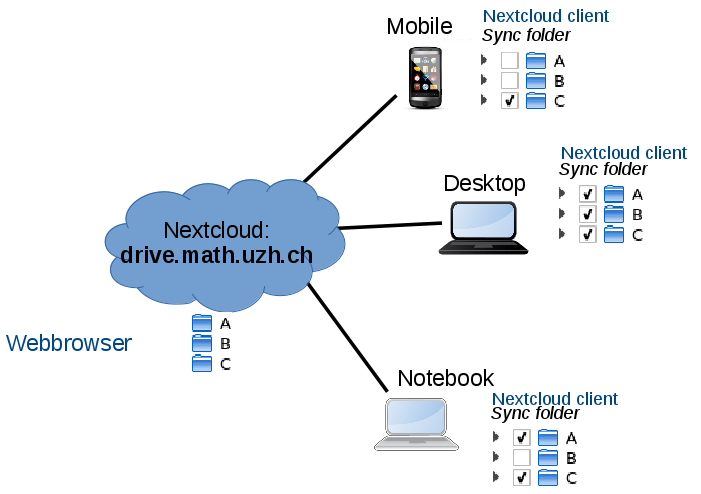
Sync different folder on different devices
- Which folders to sync can be configured per device - on the device itself.
Nextcloud Client (=App) > Settings > <config>
- Example:
- The cloud has 3 directories A, B, C.
- The mobile syncs only C.
The notebook syncs A & C
- The desktop syncs A, B, C.
Share
Collaboration with UZH-user
- Files and Folder can be shared by person, groups or anonymously
- Choose the folder or file to share. Click on the share symbol. Click on the plus.

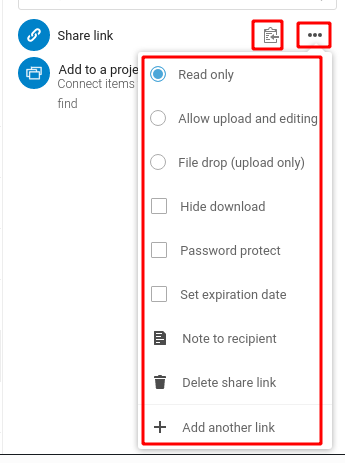
- Anonymous access:
- Click on the settings (3 points horizontal) to specify privileges.
Click on the clipboard icon (you see no action, but the link is now in your clipboard) ... go to your email program and paste the link in an email.
- Optional, define a password.
Requesting confidential files from non-UZH-user (=anonymous)
- Creating a shared folder for anonymous user:
- user can't see files stored in the folder
- user can only upload to the folder
- define wether a password is required to upload to the folder or not
Login to https://drive.math.uzh.ch/ (UZH-Credentials)
- Navigate to "Files"
- Create a new folder
- Press the three dots and click "Open Details"


Photo / Gallery
Problems
Mac OS X: sync is stale
Reset the Local Database:
- Warning: This forces a full re-sync but often fixes "stale" sync:
- Quit Nextcloud.
Open Terminal and run:
rm -rf ~/Library/Application\ Support/Nextcloud